AI fleet dash cams that flag risk as it happens
ManageVehicle’s smart fleet dash cams record the road and the cab, pick up risky moments like fatigue and distraction, and link every clip to the vehicle’s location and speed.

- ISO 9001 certified
- Australian support
- Serving fleets since 2021
“What actually happened?” Without footage, nobody can say
What changes when every risky moment comes with a clip.
Before ManageVehicle
- “It wasn’t my fault” with nothing to back it up
- Fatigue and distraction you only hear about after a crash
- Hours scrubbing through footage to find one moment
- Insurance claims that drag on for months
- Coaching based on gut feel
After ManageVehicle
- Video of the event, with speed and location
- In-cab alerts when the camera spots the signs
- Event clips saved and tagged automatically
- Footage ready to send to your insurer
- Real clips to review with drivers, fairly
What is a smart fleet dash cam?
A smart fleet dash cam is a connected camera that records the road and the driver, uses AI to spot risky events, and sends clips to fleet software with the vehicle’s location and speed.
- 01
Dashcam
Records road and cab, detects events.
- 02
Network
Sends event clips and alerts.
- 03
ManageVehicle
Links video to GPS, driver and vehicle.
- 04
Review and action
Alerts, coaching and evidence.
Choosing cameras for your trucks? Read our dash cam for trucks buyer’s guide. For a deeper look at the technology, read our fatigue detection camera buyer’s guide.
From a risky moment on the road to a coaching conversation
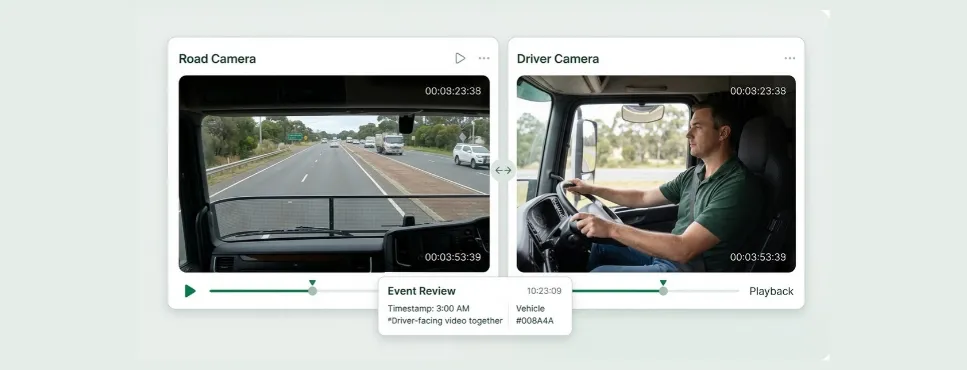
See every angle around the truck
Up to eight views. One timeline.
Record from one to eight views at once, depending on the camera: the road ahead, the driver in the cab, and rear, side or trailer views. When something goes wrong, you aren’t guessing from one angle. Play the cameras back in sync and see what happened from every side.
What your team can do:
- Road-facing video
- Driver-facing video
- Rear and side camera views
- Synced playback across channels
- Download all angles from one event together
- Live view from the cameras
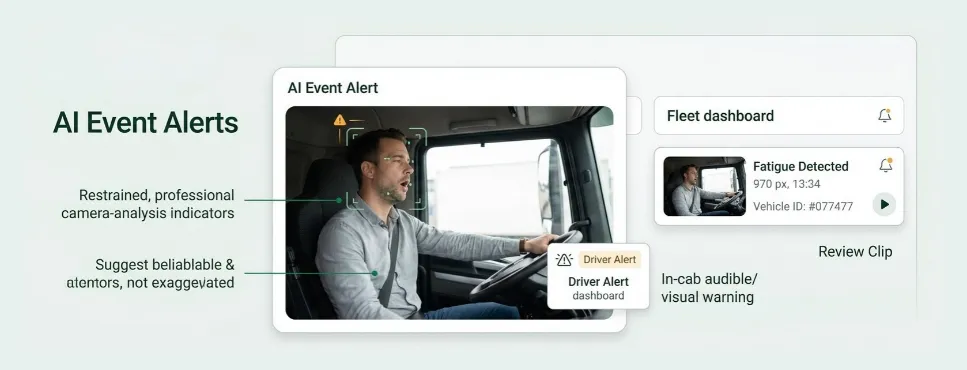
Alerts for fatigue and distraction
AI dash cam alerts that catch risky moments before they become crashes.
Depending on the camera, it watches for signs like eyes closing, yawning, looking away or using a phone, and for risks on the road like drifting out of the lane, following too closely or pedestrians near the vehicle. The driver gets an in-cab warning and your team gets an alert with the clip.
What your team can do:
- Fatigue and distraction alerts
- Phone use and smoking alerts
- Lane departure, following distance and pedestrian warnings (ADAS)
- In-cab warnings for drivers
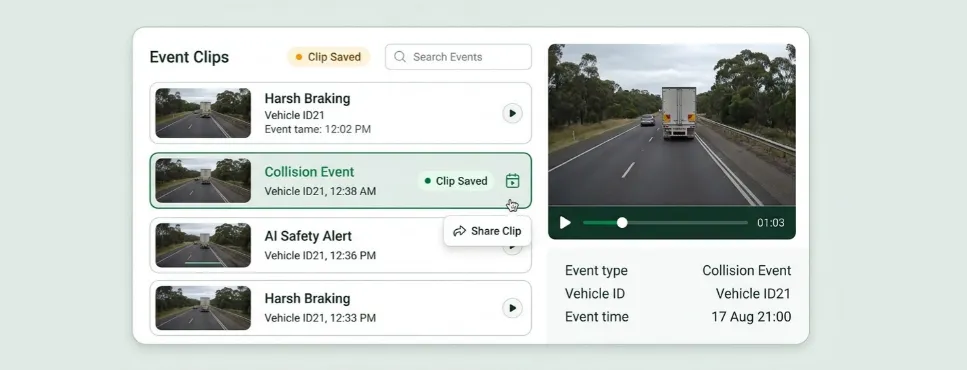
The right clip, without scrubbing through hours
Footage that’s easy to find and share.
Harsh braking, collisions and AI events trigger a clip that uploads to the cloud automatically, tagged with the event type. You can also request footage from any time it’s still on the camera’s memory card. Find the moment you need in seconds.
What your team can do:
- Automatic event clips
- Filter by event type
- Download or share footage
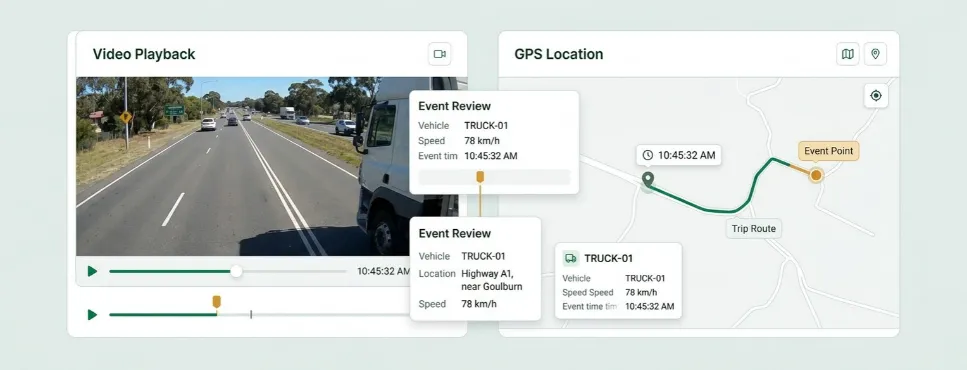
Fleet tracking with camera footage, side by side
Video plus data, side by side.
Each clip sits next to the vehicle’s GPS data, so you can see where it happened and how fast the vehicle was going. Stronger evidence for claims and disputes.
What your team can do:
- Location on the map
- Speed at the time
- Route before and after
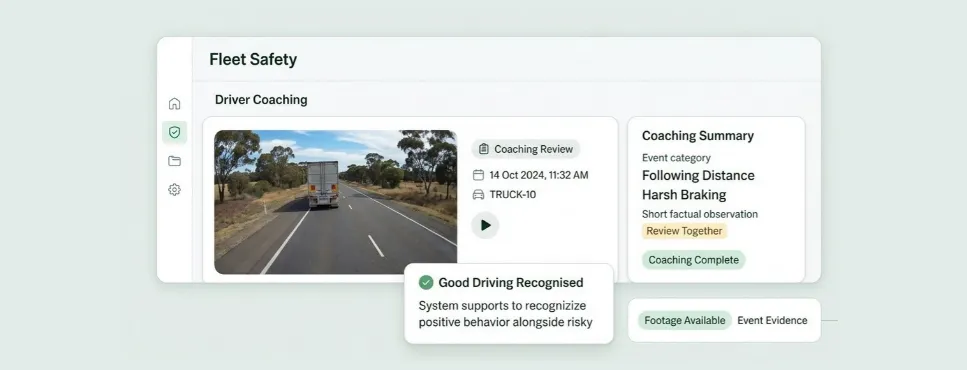
Coach drivers with real examples
Fair conversations based on facts.
Use clips to talk through risky moments with drivers, and recognise good driving too. Footage also protects drivers when they’re not at fault.
What your team can do:
- Review clips with drivers
- Track events by driver
- Show when drivers weren’t at fault
One risky moment, from the road to the record
Here’s what happens when a smart dash cam spots a tired driver, step by step.
-
2:14:07 am
The camera spots it
The driver-facing camera picks up signs of fatigue, like eyes closing.
-
2:14:07 am
The driver is warned
An in-cab warning sounds, so the driver can refocus or pull over.
-
2:14:08 am
The clip is saved
The moment is saved as a clip and tagged with the event type, speed and location.
-
Next
Your team is alerted
The event shows in ManageVehicle with the clip, and the supervisor is notified by app, email or SMS.
-
Next morning
It’s on the record
The alert sits on the driver’s fatigue record next to their hours in MV Driver, our NHVR-approved EWD.
-
That week
The driver is coached
The clip is reviewed with the driver, and the coaching is noted against the event.
What a camera can detect depends on the model. We’ll confirm the list for your cameras.
Stop asking “what actually happened?”
The questions that come up after every near miss, answered with video instead of opinions.
Who was at fault in that crash?
Watch the event clip.
Was the driver on the phone?
Check the cab footage.
How fast was it going at the time?
See speed next to the clip.
Any fatigue alerts last night?
Open the AI alert list.
Can we send this to the insurer?
Download the clip.
Video evidence that protects your drivers and your business
Footage linked to location and speed gives you a clear record for insurers, incident reviews and the reasonable steps you take under Chain of Responsibility. Not sure how cameras differ from a full IVMS? Read what an in-vehicle monitoring system is.
Evidence for claims
Clips with time, speed and location ready to share.
Fatigue and distraction on record
Every AI alert saved with the driver and time.
Works next to your EWD
Cameras show the road. MV Driver, our NHVR-approved EWD, shows the hours worked.
Workplace camera rules vary by state. In New South Wales and the ACT, employers generally need to give staff written notice at least 14 days before workplace surveillance starts (Sprintlaw: cameras in the workplace). Be open with drivers about what’s recorded and why. Most drivers come round once they see footage proving them right after an incident that wasn’t their fault.
Connected dashcams and fleet operations
Video is most useful when it’s linked to the rest of what you know about the trip, the driver and the vehicle.
-
Dashcams + GPS
Camera and GPS tracking in one view
A connected safety record can include
- Location
- Speed at the time
- Route taken
- Dashcam footage
-
Dashcams + incidents
Build incident reports with video
An incident record can include
- Event clip
- Photos from the driver
- Location and time
- Follow-up actions
-
Dashcams + fatigue
Add video to fatigue management
Fatigue records can include
- Fatigue alerts
- Hours worked
- Fit-to-drive checks
- Follow-up
-
Dashcams + driver behaviour
Back driver reports with clips
Driver records can include
- Harsh braking
- Speeding
- Distraction events
- Coaching notes
-
Reports & insights
Turn events into safety reports
Safety reports can include
- Events by driver
- Events by type
- Trends over time
- Coaching completed
-
Australian fleet operations
Dashcams built for Australian fleets
What you get
- Web and mobile access
- Designed for commercial fleets
- Australian customer support
- Supported camera hardware
Replay the route before and after any event in Vehicle Route History. Fleet dash cams are used differently in transport and logistics, passenger transport and waste management.
Standard dash cams vs smart dash cams
A standard dashcam records. A smart dashcam tells you when something worth watching just happened.
Standard dashcam
Records video to a memory card.
- Road video only, usually
- Footage pulled by hand
- No alerts
- No link to GPS or the driver
Smart dashcams with ManageVehicle
Telematics video that’s connected, AI-enabled and linked to your fleet data.
- Road and cab video
- Fatigue and distraction alerts
- Automatic event clips
- Speed and location with every clip
- Driver coaching tools
Footage in hand when an incident happens
G & V Logistics needed a faster way to get evidence when something went wrong on the road. With connected cameras and telematics in ManageVehicle, they can quickly find and share the relevant footage with insurers or other parties when an incident occurs. The same system shows where their loads are in real time.
Smart fleet dash cam FAQs
What is a smart fleet dash cam?
A connected camera that records the road and the driver, uses AI to detect risky events and sends clips to ManageVehicle with the vehicle’s speed and location.
What events can the cameras detect?
Depending on the camera, events include fatigue signs, distraction, phone use, smoking, lane departure, following too closely, pedestrians near the vehicle, harsh braking and collisions. We’ll confirm the list for your cameras.
Do drivers get a warning in the cab?
Yes. When the camera detects fatigue or distraction, the driver gets an in-cab warning so they can correct straight away.
Can I see footage with GPS data?
Yes. It works like a GPS tracker with camera footage: every clip sits next to the vehicle’s location and speed at the time, so you see the full context.
Can footage help with insurance claims?
Yes. Clips with time, speed and location give your insurer clear evidence, which can help claims move faster.
Are driver-facing cameras legal?
Workplace surveillance rules vary by state, and notice requirements usually apply. Our guide on the legal side of vehicle tracking technology covers the basics. Get legal advice for your situation.
Will drivers accept cameras?
Drivers are more likely to accept cameras when they see footage that protects them when they’re not at fault. Being upfront about why you’re installing them helps a lot.
Can I use my existing cameras?
Often, yes. ManageVehicle works with a range of fleet dash cam hardware, including Stonkam and Jimi IoT models. Tell us which cameras are in your trucks and we’ll confirm whether they’ll connect or what you’d need to add.
Do dash cams help with fatigue management?
Yes. Fatigue and distraction alerts are saved with the driver and time, alongside the hours recorded in MV Driver, our NHVR-approved EWD. Cameras support, but don’t replace, compliant work and rest hours and fit-to-drive checks. Our heavy vehicle fatigue management guide covers the rules in full.
What’s the difference between a dash cam and an IVMS?
A dash cam records video. An in-vehicle monitoring system (IVMS) records how the vehicle is driven, such as speed, harsh braking and location. ManageVehicle puts both side by side, so each clip comes with the driving data around it. Read more about what an in-vehicle monitoring system is.
How do I choose a dash cam for my trucks?
Look at what it detects, how many views it records, how clips reach you, and whether it connects to your fleet software. Our dash cam for trucks buyer’s guide walks through each one.
Can I watch live video from the cameras?
Yes. Live view lets your team see what the cameras see right now, as well as play back event clips.
How much footage does the camera store?
Footage is kept on the camera’s memory card, which can range from 128 GB to 4 TB depending on the card fitted. Event clips upload to the cloud automatically, and you can request other footage while it’s still on the card.
How long is footage kept in the cloud?
Anywhere from 3 months up to 7 years. The retention period is set to suit your business, for example to match your insurer’s or your own record-keeping requirements.
Explore more
-
Driver Behaviour
Speeding and harsh driving alerts with the time, place and driver for every event, so you can coach drivers with real data.
Explore Driver Behaviour -
Fatigue Management
Fatigue management software for HVNL. Fit-to-drive checks, fatigue alerts and breach follow-up, alongside your EWD records.
Explore Fatigue Management -
Incident Management
Fleet incident management for crashes, near misses and faults, reported from the driver app with photos, location and follow-up.
Explore Incident Management
See smart dash cams on your fleet
In a 30-minute demo, we’ll show you how event clips, GPS and driver records come together, and which cameras suit your vehicles.
- Tailored to your fleet size
- Advice on the right cameras
- Local Australian support team
See ManageVehicle in action
Tell us a bit about your fleet and we’ll be in touch within one business day.