See where your vehicles are, understand what they're doing and connect location data with drivers, jobs and vehicle activity — all from one platform built for Australian transport operators.
A simpler side-by-side look at the operational changes teams notice first.
BEFORE MANAGE VEHICLE
Manual, fragmented and reactive
Ringing drivers to find out where they are
Customers asking where their delivery is, and nobody knows
Delivery disputes that come down to who remembers best
Finding out about speeding when the fine turns up
Scrambling for records when the NHVR or an insurer asks
AFTER MANAGE VEHICLE
Connected, live and proactive
One live map for trucks and trailers
Real ETAs based on where the vehicle actually is
Arrive times, stop durations and the full location trail as proof
Speeding and harsh braking flagged the same day
Time-stamped trip history, a few clicks away
What Is GPS Fleet Tracking?
GPS fleet tracking uses a vehicle GPS device or telematics integration to send location and movement data into fleet software.
GPS Device
Vehicle or asset tracking source.
Network
Location and telemetry are transmitted.
Manage Vehicle
Fleet data becomes usable information.
Tracking & Alerts
Live map, history, geofences and events.
Product experience
From live visibility to operational follow-up, the product experience is designed to help teams understand what is happening, identify what needs attention and act with better information.
See Your Entire Fleet in Real Time
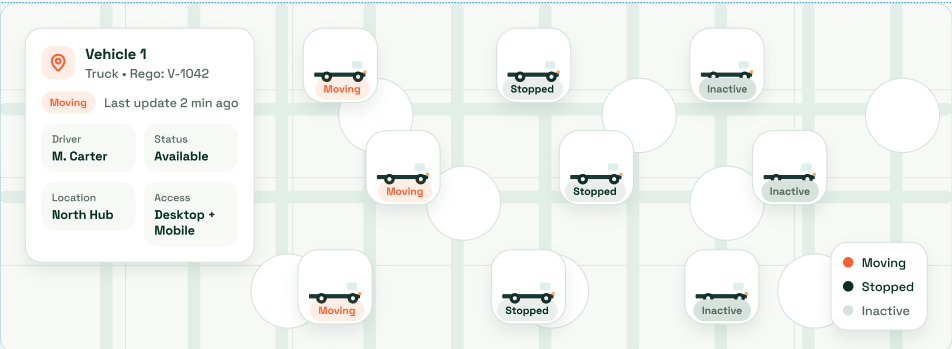
See the latest location and available status of your tracked vehicles from one live fleet map.
Operations teams can identify vehicles that are moving, stopped or inactive and open an individual vehicle for more context. That makes it easier to answer customer questions, respond to delays and make dispatch decisions without repeatedly calling drivers.
What your team can see ?
Find the Vehicle You Need
Search your tracked fleet to quickly find a vehicle and review its latest location.
Operations teams can identify vehicles that are moving, stopped or inactive and open an individual vehicle for more context. That makes it easier to answer customer questions, respond to delays and make dispatch decisions without repeatedly calling drivers.
What your team can see ?
Review Every Journey
Follow recorded routes and review timestamped trip history for your vehicles.
Operations teams can identify vehicles that are moving, stopped or inactive and open an individual vehicle for more context. That makes it easier to answer customer questions, respond to delays and make dispatch decisions without repeatedly calling drivers.
What your team can see ?
Understand Stops & Dwell Time
See where vehicles stop and how long they remain at each location.
Operations teams can identify vehicles that are moving, stopped or inactive and open an individual vehicle for more context. That makes it easier to answer customer questions, respond to delays and make dispatch decisions without repeatedly calling drivers.
What your team can see ?
Create Geofences Around Key Locations
Use location boundaries to monitor activity around depots, customer sites and delivery points.
Operations teams can identify vehicles that are moving, stopped or inactive and open an individual vehicle for more context. That makes it easier to answer customer questions, respond to delays and make dispatch decisions without repeatedly calling drivers.
What your team can see ?
Track Arrivals & Departures
Review when vehicles arrive at and leave the locations that matter to your operation.
Operations teams can identify vehicles that are moving, stopped or inactive and open an individual vehicle for more context. That makes it easier to answer customer questions, respond to delays and make dispatch decisions without repeatedly calling drivers.
What your team can see ?
Keep Up with Fleet Activity
Use fleet alerts to bring relevant vehicle activity to your team’s attention.
Operations teams can identify vehicles that are moving, stopped or inactive and open an individual vehicle for more context. That makes it easier to answer customer questions, respond to delays and make dispatch decisions without repeatedly calling drivers.
What your team can see ?
Review Vehicle Speed
Use recorded speed information alongside location and trip history.
Operations teams can identify vehicles that are moving, stopped or inactive and open an individual vehicle for more context. That makes it easier to answer customer questions, respond to delays and make dispatch decisions without repeatedly calling drivers.
What your team can see ?
Understand Driver Behaviour
Connect vehicle activity with driver context to support your fleet safety workflow.
Operations teams can identify vehicles that are moving, stopped or inactive and open an individual vehicle for more context. That makes it easier to answer customer questions, respond to delays and make dispatch decisions without repeatedly calling drivers.
What your team can see ?
Stop Asking “Where's My Truck?”
Good GPS tracking turns raw location data into answers your team can use during the working day.
Where is Truck 24?
See its latest tracked location.
Has it reached the customer?
Check arrival information.
How long was it stopped?
Review dwell time.
Which route did it take?
Open trip history.
Was it moving during an incident?
Review tracking context.
Location records you can actually use when the NHVR asks
Every trip, stop and speed event is stored with a time and place, so you have a clear record when you need to show the reasonable steps you’ve taken under Chain of Responsibility.
Chain of Responsibility in Australia: 2026 HVNL Guide
Pull up exactly where a vehicle was and how it was driven on any given day.
Speed records by road and time
See speeding events against the posted limit, not just a raw number.
Works next to your EWD
GPS shows where. MV Driver, out NHVR - approved EWD, records work and rest. Both in one place.
Connected GPS & fleet operations
Connect GPS tracking, cameras, safety, maintenance, reporting and hardware integrations into one fleet operations workflow — with location context, mobile app activity and job-level visibility.
GPS + POD
Add Location Context to Proof of Delivery
A connected delivery record can include
Driver and vehicle
Delivery date and time
Relevant location context
POD, signature or photos
GPS + dashcams
Connect GPS Tracking With Smart Dashcams
A connected delivery record can include
Safety follow-up
Driver information
Vehicle location
Dashcam footage
Telematics events
GPS + safety
Give Safety Teams Better Event Context
A connected safety record can include
Driver and vehicle
Event date and time
Incident, fault or inspection
Relevant location context
Photos and safety records
GPS + maintenance
Use Vehicle Data to Support Maintenance
Maintenance workflows can include
Scheduled services
Vehicle inspections and faults
Repairs and reminders
Service history and vehicle records
GPS tracking vs fleet management
GPS tracking explains location and movement. Fleet management software manages the wider operation around those vehicles.
GPS Tracking Software
Focuses on vehicle location, movement and tracking events.
Real operators, real problems, and what changed once everything sat in one system.
Brandon Manion Coaches
Problem
Maintenance across the bus fleet was difficult to track, with information spread across driver checks and maintenance records.
Result
Drivers complete daily inspections, record odometer readings and report faults directly in Manage Vehicle. The maintenance team has clear, up-to-date visibility of what needs attention. Better maintenance visibility. Fewer missed issues. A fleet that stays on top of its maintenance.
G & V Logistics
Problem
Limited visibility of where loads are while in transit, and difficulty quickly accessing evidence when an incident occurs.
Result
With telematics, G & V Logistics can see where their loads are in real time and share location details with clients immediately. In the event of an incident, they can quickly access and share relevant footage with insurers or other parties.
Alpine Civil Earthmoving
Problem
Limited visibility of how equipment is being used on site, making it difficult to track operating hours and actual equipment utilisation.
Result
Telematics gives Alpine Civil clear visibility of where equipment is and how long it has been operating on site. This helps them monitor utilisation, track equipment activity and better understand how their machines are being used. Better equipment visibility. Better utilisation tracking. More control over site operations.
Veera Transport
Problem
Jobs, PODs and invoicing were previously managed in batches, with the team waiting until the end of the week to collect everything and process invoices.
Result
Jobs are now allocated, driver approval is captured, PODs are recorded, and invoices are sent to the client within 15 minutes of job completion. Faster invoicing. Faster payments. Better cash flow.
GPS Fleet Tracking FAQs
GPS fleet tracking records vehicle locations and brings that information into a fleet map, helping your team understand vehicle movement and activity.
The live fleet map shows the latest available tracked location and status. Updates depend on the connected device and network coverage.
You can review recorded trip history, including routes and timestamped location activity.
Geofencing lets you define boundaries around locations such as depots, delivery sites and customer premises.
Stop and dwell time information helps you review where a vehicle stopped and how long it remained there.
Fleet alerts help your team follow relevant vehicle activity. Available alerts depend on your setup.
ManageVehicle connects location context with jobs and dispatch activity so teams can work from shared information.
Location data can support connected workflows for cameras, safety, maintenance, reporting and other fleet operations.
Supported integrations depend on your hardware and configuration. Book a demo to confirm compatibility with your fleet’s devices.
Dispatch teams can use vehicle locations and trip context to identify vehicles and coordinate work.
Ready to Run Like the Best?
Get a 30-minute walkthrough of ManageVehicle set up around your fleet. We'll show you how tracking, EWD,
maintenance and risk management work together, and answer your HVNL questions on the spot.
Walkthrough based on your fleet size and setup
Your HVNL and EWD questions answered live
Local Australian support team
See ManageVehicle in action
Tell us a bit about your fleet and we'll be in touch within one business day.







 Brandon Manion Coaches
 G & V Logistics
 Alpine Civil Earthmoving
 Veera Transport