Fleet Geofencing Software for Yards, Sites and Customers
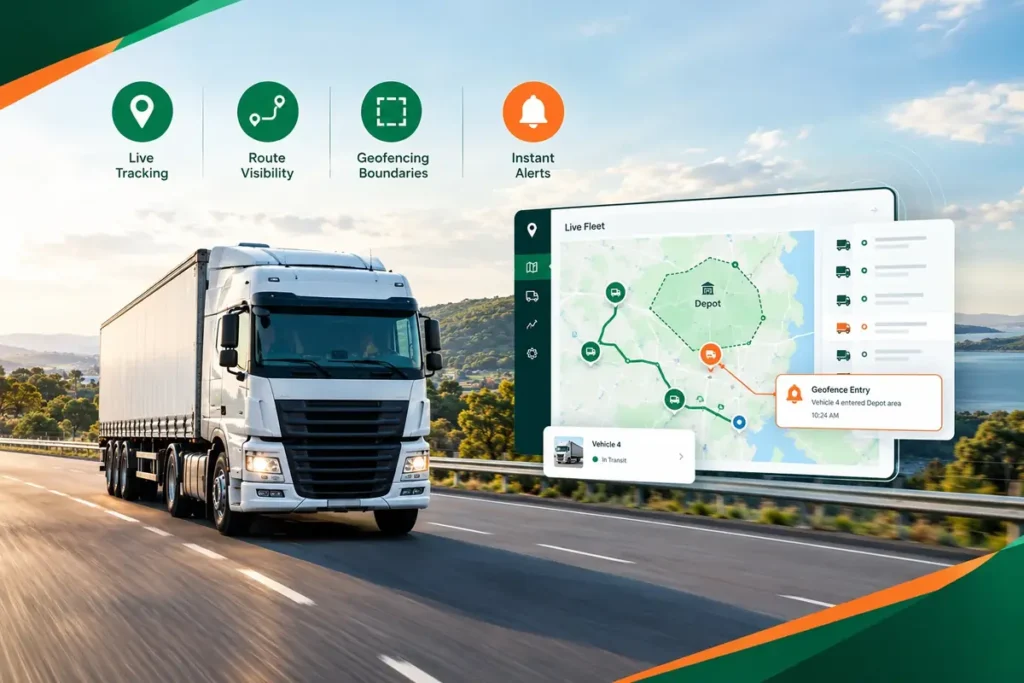
Fleet geofencing software from ManageVehicle puts a virtual fence around the places your vehicles go every day. You hear the moment a truck arrives, leaves or sits too long, without ringing a single driver.
What changes when your yards and sites start reporting in on their own
BEFORE MANAGE VEHICLE
Lorem Ipsum is simply dummy text of the printing
Ringing the yard to check if a truck is back
Finding out a vehicle moved after hours the next morning
Trucks sitting at a customer dock for hours and nobody notices
Arguing over what time a driver got to site
AFTER MANAGE VEHICLE
Lorem Ipsum is simply dummy text of the printing
An arrival alert the moment it rolls through the gate
An after-hours movement alert on your phone, straight away
An overstay alert once dwell time passes your limit
Time-stamped entry and exit records for every zone
Rules per zone, vehicle and time of day, so only the useful ones land
What Is Fleet Geofencing Software?
Fleet geofencing software lets you draw a boundary on a map and get notified when a tracked vehicle crosses it, or stays inside longer than it should.
GPS Device
Reports where the vehicle is.
Your Zones
The yards, sites and customers you drew on the map
ManageVehicle
Checks every position against your zones.
Alerts & Records
Sends the alert and saves the event to history.
Product experience
From drawing a zone to the alert on your phone
Draw zones around the places that matter
Drop a circle around a customer's dock or trace the exact shape of your yard, a quarry or a job site. Name it once and use it for every vehicle.
Create reusable geofences for the places your fleet visits every day.
What your team can do:
Circles and custom shapes
Named sites and site groups
Apply to the whole fleet or selected vehicles
Know when vehicles arrive and leave
Every time a vehicle crosses a zone boundary, ManageVehicle logs it. Your dispatcher sees the depot exit at 5:42am and the customer arrival at 7:15am without asking anyone.
Arrivals and departures logged automatically, with the time and vehicle.
What your team can do
Entry alerts for customer sites
Exit alerts for depots and yards
Arrival times shared with customers
Catch the trucks that sit too long
Set how long a vehicle should spend at a site. If it goes over, you get told while there's still time to do something about it, not at the end of the week.
Spot slow docks, long lunches and stuck vehicles early
What your team can do:
Dwell limits per site
Overstay alerts as they happen
Average time on site by customer
Only get the alerts you actually need
Choose which zones, vehicles and hours trigger an alert, and who receives it. A yard exit at 2am matters. The same exit at 7am usually doesn't.
Fewer, better alerts that people keep reading.
What your team can do:
Rules by zone and vehicle
After-hours and weekend rules
Pick who gets each alert
Every zone event, saved and searchable
Look back at any day to see which vehicles visited a site, when they arrived and how long they stayed. Handy for customer disputes, invoices and audits.
A clear record you can filter, review and export.
What your team can do:
Filter by site, vehicle or date
See entry, exit and dwell together
Export for reports and disputes
Stop Asking "Has It Arrived Yet?"
Geofences turn the questions your team asks all day into answers that turn up on their own.
Where is Truck 24?
See its latest tracked location.
Has it reached the customer?
Check arrival information.
How long was it stopped?
Review dwell time.
Which route did it take?
Open trip history.
Was it moving during an incident?
Review tracking context.
Site records that stand up when someone asks
Every entry, exit and overstay is stored with a time and place. That gives you evidence for customer disputes, site access checks and the reasonable steps you take under Chain of Responsibility.
Time-stamped site visits
Show exactly when a vehicle arrived and left, down to the minute.
Restricted zone records
Show that vehicles stayed out of areas they shouldn't enter.
Works next to your EWD
Geofences show where. MV Driver, our NHVR-approved EWD, records work and rest. Both in one place.
Connected geofencing & fleet operations
Link zone events with jobs, cameras, driver behaviour, maintenance and reports, so a single arrival or exit tells the full story.
GPS + POD
Update Job Progress at the Customer's Gate
A connected delivery record can include
Driver and vehicle
Delivery date and time
Relevant location context
POD, signature or photos
GPS + dashcams
See What Happened Inside a Zone
A connected delivery record can include
Safety follow-up
Driver information
Vehicle location
Dashcam footage
Telematics events
GPS + safety
Watch Driving Where the Risk Is Higher
A connected safety record can include
Driver and vehicle
Event date and time
Incident, fault or inspection
Relevant location context
Photos and safety records
GPS + maintenance
Know When a Vehicle Reaches the Worksho
Maintenance workflows can include
Scheduled services
Vehicle inspections and faults
Repairs and reminders
Service history and vehicle records
Geofencing vs GPS tracking
GPS tracking shows where a vehicle is. Geofencing tells you when that location actually means something.
GPS Tracking Software
Focuses on where each vehicle is and where it has been.
Real operators, real problems, and what changed once everything sat in one system.
Brandon Manion Coaches
Problem
Maintenance across the bus fleet was difficult to track, with information spread across driver checks and maintenance records.
Result
Drivers complete daily inspections, record odometer readings and report faults directly in Manage Vehicle. The maintenance team has clear, up-to-date visibility of what needs attention. Better maintenance visibility. Fewer missed issues. A fleet that stays on top of its maintenance.
G & V Logistics
Problem
Limited visibility of where loads are while in transit, and difficulty quickly accessing evidence when an incident occurs.
Result
With telematics, G & V Logistics can see where their loads are in real time and share location details with clients immediately. In the event of an incident, they can quickly access and share relevant footage with insurers or other parties.
Alpine Civil Earthmoving
Problem
Limited visibility of how equipment is being used on site, making it difficult to track operating hours and actual equipment utilisation.
Result
Telematics gives Alpine Civil clear visibility of where equipment is and how long it has been operating on site. This helps them monitor utilisation, track equipment activity and better understand how their machines are being used. Better equipment visibility. Better utilisation tracking. More control over site operations.
Veera Transport
Problem
Jobs, PODs and invoicing were previously managed in batches, with the team waiting until the end of the week to collect everything and process invoices.
Result
Jobs are now allocated, driver approval is captured, PODs are recorded, and invoices are sent to the client within 15 minutes of job completion. Faster invoicing. Faster payments. Better cash flow.
Fleet Geofencing FAQs
It lets you draw virtual boundaries around depots, customer sites, quarries or any other location, then alerts you when a tracked vehicle enters, leaves or stays too long. ManageVehicle runs it on the same platform as your GPS tracking, jobs and compliance records.
Yes. Use a circle for a simple site, or trace a custom shape around a yard, job site or quarry boundary so the zone matches the real area.
Entry, exit, dwell or overstay, and after-hours movement. You choose which zones and vehicles each rule applies to and who receives the alert.
It depends on the GPS device and how often it reports. GPS is usually accurate to within several metres, so draw zones a little larger than the site itself to avoid missed or false alerts.
Yes. Set rules for after hours, weekends or specific time windows, so a 2am yard exit gets flagged and a normal morning departure doesn't.
No. Geofence events come from the vehicle's GPS device, so drivers just drive. Your team sees the events in ManageVehicle.
They help. Time-stamped site visits and restricted zone records are part of showing the reasonable steps you take. They work best alongside your fatigue, maintenance and EWD records.
Yes. Arrival and departure events at a customer zone can give your team live job progress and time on site, which pairs well with proof of delivery in Job Dispatch.
Explore More Manage Vehicle Solutions
Route History
Trace your fleet's journey effortlessly with Route and Location History. Our GPS fleet tracking software keeps a comprehensive...
Get a 30-minute walkthrough of ManageVehicle set up around your fleet. We'll show you how tracking, EWD,
maintenance and risk management work together, and answer your HVNL questions on the spot.
Walkthrough based on your fleet size and setup
Your HVNL and EWD questions answered live
Local Australian support team
See ManageVehicle in action
Tell us a bit about your fleet and we'll be in touch within one business day.