Fleet maintenance software that keeps every vehicle earning
ManageVehicle’s fleet maintenance software tracks services, pre-start checks, defects and repairs for every truck, trailer, ute and machine in one place. Nothing slips through because someone forgot to update the whiteboard.

- NHVR-approved EWD
- ISO 9001 certified
- Australian support
- Serving fleets since 2021
The headaches we hear about most
What changes when fleet maintenance stops living on a whiteboard.
Manual, fragmented and reactive
- Services tracked on a whiteboard or in someone’s head
- Paper pre-start sheets lost in the cab
- Defects reported verbally and then forgotten
- Breakdowns that “came out of nowhere”
- Digging through folders when an auditor asks
Connected, live and proactive
- Reminders by km, engine hours or date for every vehicle
- Pre-start checks done on the driver’s phone, saved instantly
- Defects logged with photos and tracked until they’re fixed
- Overdue services flagged before they become breakdowns
- Full service history per vehicle, a few clicks away
What is fleet maintenance software?
Fleet maintenance software schedules, records and tracks the servicing, inspections and repairs for every vehicle and piece of equipment in your fleet. Think of it as a vehicle maintenance management system built for the yard and the workshop.
- 01
Vehicle usage
Kilometres, engine hours and dates.
- 02
Driver checks
Pre-starts and defects from the driver app.
- 03
ManageVehicle
Plans services and tracks every job.
- 04
Reminders and records
Alerts before it’s due, history after it’s done.
From the first pre-start to the signed-off repair
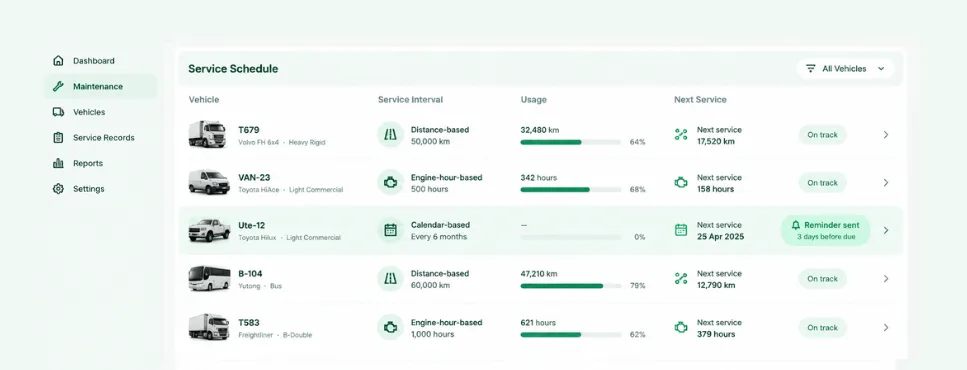
Set service intervals once and let reminders do the rest
No more missed services or guesswork on what’s due.
Set fleet servicing intervals by kilometres, engine hours or calendar date for each vehicle or vehicle type. ManageVehicle tracks usage and reminds your team before each service falls due.
What your team can do:
- Intervals by km, hours or date
- Upcoming and overdue lists
- Different schedules per vehicle type
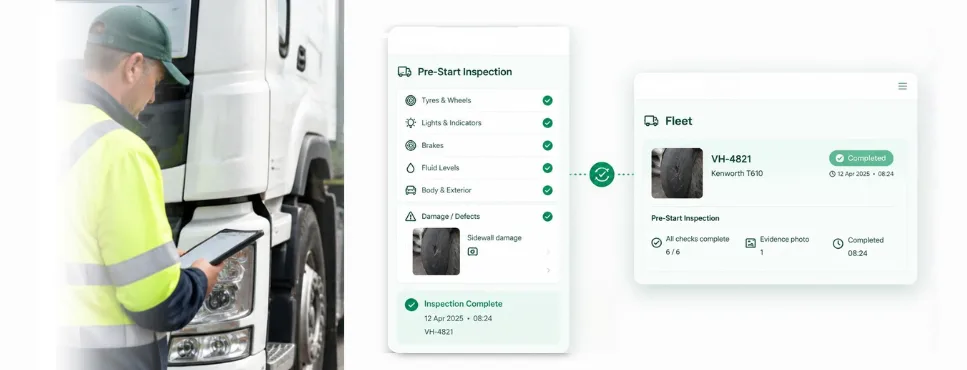
Daily checks done on the phone, not on paper
Proof the check happened, every day.
Drivers complete pre-start checks in the driver app before they head off. Answers, photos and time stamps are saved straight away, so you know every vehicle was checked.
What your team can do:
- Custom checklists per vehicle
- Photos for anything that fails
- See who checked what, and when
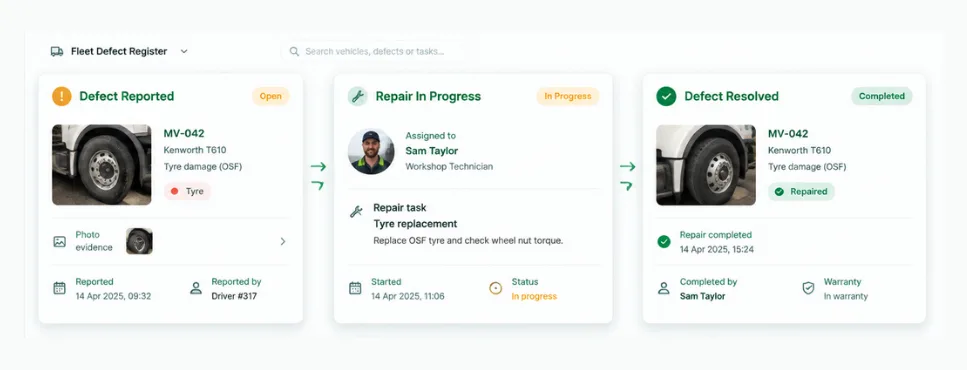
Every defect tracked until it’s fixed
Clear ownership from report to repair.
A failed check or a driver report becomes a defect your workshop can see. Assign it, track the repair and close it out, so nothing gets lost between the yard and the workshop.
What your team can do:
- Log defects with photos
- Assign and track repairs
- Mark vehicles off the road
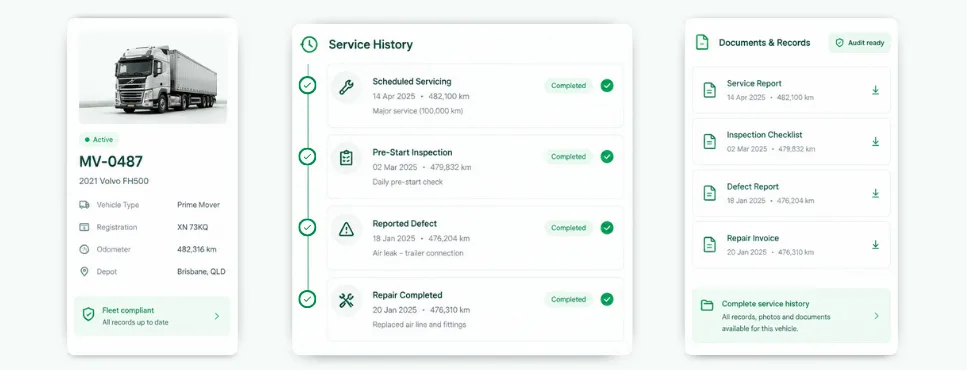
The full story of every vehicle
Records that are ready whenever someone asks.
Every service, inspection, defect and repair is stored against the vehicle. Pull it up for an audit, an insurance claim or when you’re deciding whether to keep or replace a vehicle.
What your team can do:
- Full history per vehicle
- Attach invoices and documents
- Export for audits
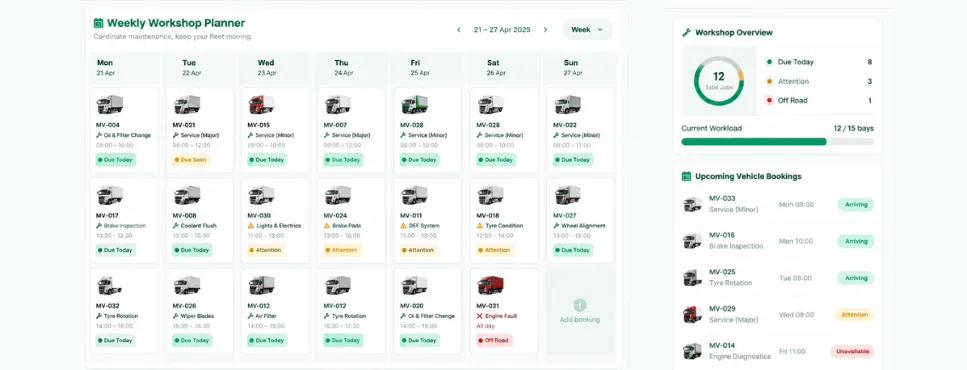
See the week ahead for your workshop
Plan maintenance around the work, not the other way round.
Use it as vehicle workshop software: see which vehicles are due in, which are overdue and which are off the road, so you can plan workshop time around the jobs that need those vehicles.
What your team can do:
- Upcoming services at a glance
- Vehicles off the road
- Plan around scheduled jobs
Service schedules for every kind of asset
Every asset wears differently, so ManageVehicle lets you set the right kind of schedule for each one, using your manufacturer’s intervals or your own.
-
Prime movers and rigid trucks
- Scheduled by
- Kilometres, with engine hours for idling-heavy work
- Sample status
- Due in 1,200 km
- What you get
- Services booked on real distance, read automatically if telematics is fitted
-
Trailers and dollies
- Scheduled by
- Date, or kilometres from a hubodometer reading
- Sample status
- Brake and bearing check due 14 Dec
- What you get
- Trailers that never miss a service just because they don’t have an engine
-
Plant and machinery
- Scheduled by
- Engine hours
- Sample status
- Due in 35 hrs
- What you get
- Servicing on real running time, even with no odometer
-
Utes, vans and light vehicles
- Scheduled by
- Kilometres or months, whichever comes first
- Sample status
- Due in 3 weeks
- What you get
- Light vehicles that don’t get forgotten behind the heavy fleet
-
Buses and coaches
- Scheduled by
- Kilometres, plus daily walkaround checks
- Sample status
- 2 open defects
- What you get
- Passenger vehicles checked every day and serviced on time
Prefer to start on paper? Download our free truck maintenance log template.
Stop asking “when was that last serviced?”
The maintenance questions that usually need a phone call or a filing cabinet, answered in seconds.
When was Truck 8 last serviced?
Open its service history.
What’s due this week?
Check the upcoming services list.
Did today’s pre-starts get done?
See completed checks by vehicle.
Is that brake defect fixed yet?
Check the defect status.
Which vehicles are off the road?
View vehicles marked unavailable.
Maintenance records that hold up in an audit
Vehicle standards are part of your duties under Chain of Responsibility. Time-stamped checks, defects and repairs show the reasonable steps you’ve taken to keep vehicles safe. Read our heavy vehicle inspection and pre-start checklist guide.
Daily pre-start proof
Every check saved with the driver, vehicle and time.
Defect to repair trail
Show when a fault was reported, who fixed it and when.
Works next to your EWD
Maintenance covers the vehicle. MV Driver, our NHVR-approved EWD, covers the driver’s work and rest.
How Brandon Manion Coaches stays on top of maintenance
Brandon Manion Coaches used to have maintenance information spread across drivers’ checks and separate records, so it was hard to see what each bus needed. Now drivers do their daily inspections in the ManageVehicle app, log odometer readings and report faults as they find them. The maintenance team sees what needs attention across the whole fleet, and fewer issues slip through.
Solutions used- Fleet Maintenance
- Driver App
Connected maintenance and fleet operations
Maintenance gets easier when it shares data with telematics, drivers, incidents and costs.
-
Maintenance + telematics
Service on real usage
Usage data can include
- Odometer readings
- Engine hours
- Reported faults
- Utilisation
-
Maintenance + driver app
Let drivers report problems fast
Driver reports can include
- Pre-start checks
- Defects with photos
- Vehicle and time
- Driver notes
-
Maintenance + incidents
Link repairs to what happened
A connected incident record can include
- Incident report
- Damage photos
- Repair job
- Return to service
-
Maintenance + costs
Know what each vehicle costs to keep
Cost records can include
- Service and repair costs
- Parts and invoices
- Fuel spend
- Cost per vehicle
-
Reports & insights
Turn maintenance data into decisions
Maintenance reports can include
- Services completed
- Overdue services
- Defects by vehicle
- Downtime
-
Australian fleet operations
Maintenance built for Australian fleets
What you get
- Web and mobile access
- Trucks
- Trailers and plant
- Australian customer support
- Driver app on iOS and Android
Preventive vs reactive maintenance
Reactive maintenance fixes things once they break. Preventive maintenance stops most of them breaking in the first place.
Reactive maintenance
Fix it when it fails.
- Unplanned breakdowns
- Towing and roadside costs
- Missed jobs and late deliveries
- Patchy records
Preventive maintenance with ManageVehicle
Plan it before it fails, with maintenance management software built for fleets.
- Usage-based service reminders
- Daily pre-start checks
- Defects tracked to repair
- Complete service history
- Planned workshop time
Fleet maintenance FAQs
What is fleet maintenance software?
Fleet maintenance management software plans and records servicing, inspections, defects and repairs for every vehicle in your fleet. ManageVehicle keeps it all in one place and reminds your team before anything falls due.
Can I schedule services by kilometres or engine hours?
Yes. Set intervals by kilometres, engine hours or date. With a connected telematics device, usage updates automatically.
Can drivers do pre-start checks on their phone?
Yes. Drivers complete pre-start checks in the driver app on iOS or Android, with photos for anything that fails.
What happens when a driver reports a defect?
It’s logged against the vehicle with photos and time stamps. Your team can assign it, track the repair and close it out once it’s fixed.
Can I keep service history for trailers and machinery too?
Yes. It works as truck maintenance software and plant maintenance software in one, so trucks, trailers, light vehicles and plant each get their own schedules and history.
Does fleet maintenance software help with compliance?
It helps you show the reasonable steps you take on vehicle standards. Checks, defects and repairs are all time-stamped and easy to pull up for an audit. Read more about vehicle standards and maintenance duties in our NHVR compliance guide.
Can I attach invoices and documents?
Yes. Attach invoices, work orders and other documents to each service so the full record sits with the vehicle.
How long does setup take?
It depends on fleet size and how much history you bring across. Our Australian team helps you load vehicles and set schedules during onboarding.
What’s the difference between a fleet maintenance system and a spreadsheet?
A spreadsheet only knows what someone types into it. A fleet maintenance system reads usage from the vehicle, takes pre-starts and defects straight from drivers, and reminds you before a service is due. If you’re starting on paper, our free maintenance log template is a good first step.
Can I mark a vehicle off the road?
Yes. A vehicle with a safety-critical defect can be marked off the road, so everyone can see it shouldn’t be used until the repair is signed off.
Explore more
-
Vehicle Telematics
Vehicle telematics software that reads engine hours, odometer, faults and speed straight from your vehicles, so you can act early.
Explore Vehicle Telematics -
Compliance Reporting
Fleet compliance reporting with licences, rego and inspections in one place, expiry reminders and audit-ready reports.
Explore Compliance Reporting -
Incident Management
Fleet incident management for crashes, near misses and faults, reported from the driver app with photos, location and follow-up.
Explore Incident Management
See your maintenance schedule in the demo
In a 30-minute demo, we’ll set up service schedules for a few of your vehicle types and show you how pre-starts, defects and reminders would work for your workshop.
- Tailored to your fleet size
- Live answers on HVNL and EWD
- Local Australian support team
See ManageVehicle in action
Tell us a bit about your fleet and we’ll be in touch within one business day.