Vehicle temperature monitoring for refrigerated fleets
Know your load is at the right temperature from pickup to drop-off. ManageVehicle’s vehicle temperature monitoring shows live readings, alerts you when things drift and keeps a record for every load.

- NHVR-approved EWD
- ISO 9001 certified
- Serving fleets since 2021
The headaches we hear about most
What changes when your fridge units report in on their own.
Before ManageVehicle
- Finding out a fridge failed when the customer rejects the load
- Drivers writing temperatures on a paper log
- Customers asking for proof the cold chain held
- No idea which unit keeps running warm
- Spoiled stock and nobody can say when it happened
After ManageVehicle
- An out-of-range alert while there’s still time to act
- Readings recorded automatically through the trip
- A temperature record for every load, ready to send
- Temperature history by vehicle and trailer
- Time and location of every temperature change
What is vehicle temperature monitoring?
Vehicle temperature monitoring uses sensors in a refrigerated truck or trailer to send temperature readings to fleet software, so you can watch the load live and keep a record of the trip.
- 01
Temperature sensor
Measures the load area.
- 02
Telematics device
Sends readings with location.
- 03
ManageVehicle
Checks readings against your range.
- 04
Alerts and records
Warns you early and saves the history.
From the sensor in the box to proof for the customer
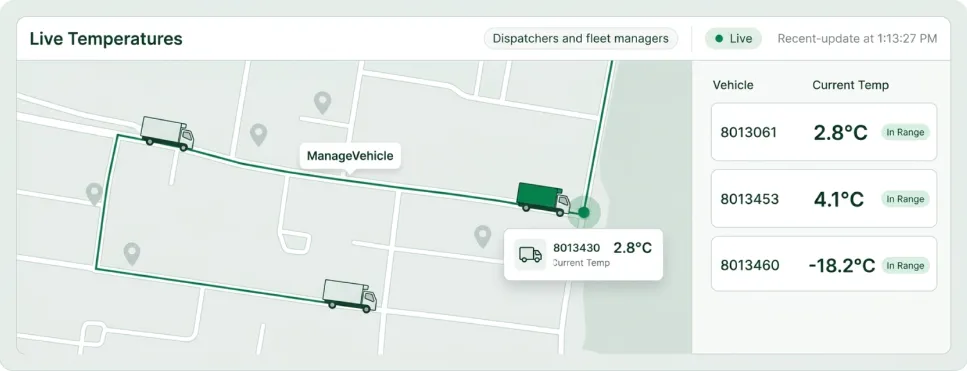
See load temperatures in real time
One screen for location and temperature.
Check the current temperature of every refrigerated vehicle on the same map you use for tracking. No calling drivers to read the display.
What your team can do:
- Live temperature per vehicle
- Location next to each reading
- Fleet-wide view
Get warned before the load is at risk
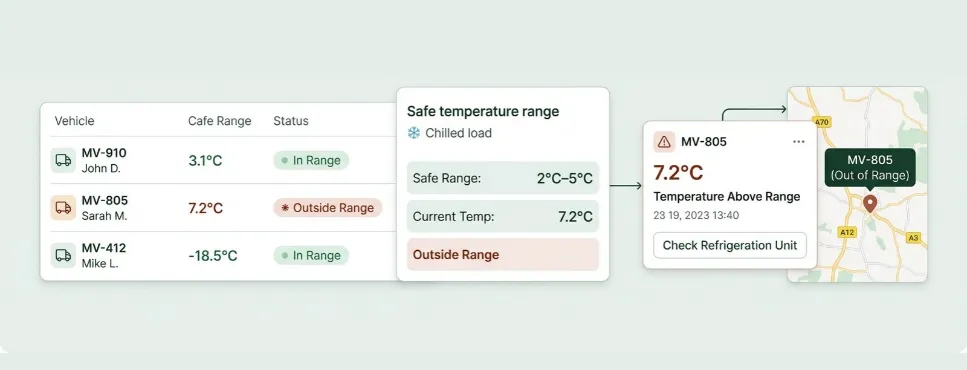
Act early, save the load.
Set the safe range for chilled or frozen loads. If a reading goes outside it, your team gets an alert so the driver can check the unit before stock is lost.
What your team can do:
- Set ranges per vehicle or load
- Out-of-range alerts
- Choose who gets notified
A temperature record for every load
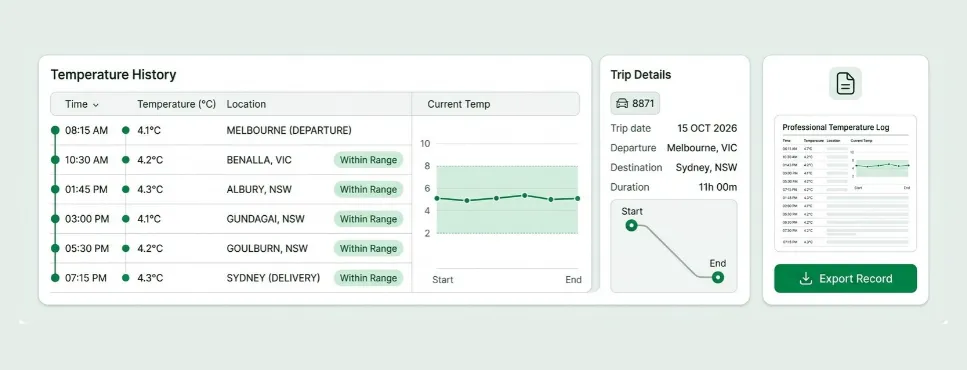
Proof you can hand over.
Every reading is saved with the time and location. Pull up the record for a trip and show the customer the cold chain held from start to finish.
What your team can do:
- Readings saved per trip
- Time and place for each reading
- Records ready to share
Spot fridge units that are struggling
Fix the unit before it fails on the road.
Look back at temperature history by vehicle or trailer. A unit that keeps drifting warm is a service job waiting to happen.
What your team can do:
- History by vehicle and trailer
- Spot repeat problems
- Link to maintenance
Temperature reports for customers and audits
Clean records without the clipboard.
Export temperature reports for a trip, a vehicle or a date range. Useful for customer requests, quality checks and food safety audits.
What your team can do:
- Reports by trip or date
- Out-of-range events listed
- Export to share
The temperatures that matter in the cold chain
Food businesses that transport food must keep it safe and at the right temperature. Here are the limits Food Standards Australia New Zealand sets out for potentially hazardous food, and how monitoring helps you show you stayed inside them.
-
Frozen
Frozen food should stay frozen hard for the whole trip.
In ManageVehicleSet a frozen range and get an alert if the reading rises
-
Chilled: 5°C or colder
Cold potentially hazardous food (like meat, dairy and many prepared foods) should be kept at 5°C or colder.
In ManageVehicleSet a chilled range per vehicle or load
-
Between 5°C and 60°C
Neither cold nor hot enough. The zone to keep potentially hazardous food out of.
In ManageVehicleAn out-of-range alert shows when and where the load entered this zone
-
Hot: 60°C or hotter
Hot potentially hazardous food should be kept at 60°C or hotter.
In ManageVehicleSet a range that suits the load
Your customer or your food safety program may set tighter ranges, and other goods have their own requirements. Read Transporting food safely from Food Standards Australia New Zealand. General information only.
Stop asking “is the fridge still cold?”
The cold chain questions your team gets every day, answered without a phone call.
What’s the temp in Trailer 3 right now?
Check the live reading.
Did it go out of range on the way?
Review the trip record.
When did the problem start?
See the time and location of the alert.
Can the customer have proof?
Export the temperature report.
Which unit keeps running warm?
Compare history by vehicle.
Cold chain records that stand up to questions
Customers and auditors want to see that the load stayed in range. Automatic, time-stamped readings give you that proof without relying on handwritten logs.
Readings with time and place
Every reading tied to when and where it was taken.
Out-of-range events on record
Show what happened, when, and how quickly it was handled.
Works next to your EWD
Temperature covers the load. MV Driver, our NHVR-approved EWD, covers the driver’s work and rest.
Connected temperature and fleet operations
Temperature data means more when it sits next to the job, the route and the vehicle’s maintenance.
-
Temperature + jobs
Attach temperature records to deliveries
A connected delivery record can include
- Load temperature on the trip
- Delivery time
- Location
- POD, signature or photos
-
Temperature + GPS
See where a problem started
A connected trip record can include
- Location of each reading
- Route taken
- Stops and dwell
- Speed
-
Temperature + maintenance
Turn warm units into service jobs
Maintenance workflows can include
- Fridge unit service reminders
- Defects
- Repairs
- Service history
-
Temperature + alerts
Get the right people moving
Alert rules can include
- Range per vehicle
- Who gets notified
- Alert history
- Follow-up notes
-
Reports & insights
Turn readings into cold chain reports
Temperature reports can include
- Readings by trip
- Out-of-range events
- Unit history
- Date range exports
-
Australian fleet operations
Temperature monitoring built for Australian fleets
What you get
- Web and mobile access
- Designed for commercial fleets
- Australian customer support
- Supported sensors and devices
Manual temperature logs vs automatic monitoring
A paper log shows what the driver wrote down. Monitoring shows what actually happened.
Manual temperature logs
Depend on someone remembering to check.
- Readings a few times a trip
- Handwritten and easy to lose
- Problems found late
- Hard to prove to customers
Vehicle temperature monitoring
Records the load the whole way.
- Readings through the trip
- Out-of-range alerts
- Time and location on every reading
- Reports ready to share
- Unit history for maintenance
Vehicle temperature monitoring FAQs
What is vehicle temperature monitoring?
It uses sensors in refrigerated trucks and trailers to send temperature readings to ManageVehicle, so you can watch loads live, get alerts and keep a record for each trip.
Can I get alerts when the temperature goes out of range?
Yes. Set a safe range for each vehicle or load type and choose who gets notified. Alerts arrive by app notification, email or SMS, so the driver can check the unit before stock is lost.
Can I show customers the temperature for their delivery?
Yes. Each trip has its own temperature record, which can be attached to the job and its proof of delivery, and exported to share.
Does it work for chilled and frozen loads?
Yes. Set the range that suits the load, whether it’s chilled, frozen or another controlled temperature.
What hardware do I need?
A supported temperature sensor and telematics device in the refrigerated vehicle or trailer. We’ll talk through the right setup for your fleet during the demo.
Can I see where a temperature problem started?
Yes. Every reading is saved with the location, so you can see where and when the temperature started to drift.
Can temperature history help with maintenance?
Yes. A unit that keeps running warm shows up in its history, so you can book it in before it fails on a run.
Do drivers need to record temperatures manually?
No. Readings are recorded automatically, so drivers can focus on driving.
What temperature should chilled food be transported at?
Under the Food Standards Code, cold potentially hazardous food should be kept at 5°C or colder, and frozen food should stay frozen hard. Your customer may ask for a tighter range. See Food Standards Australia New Zealand for the details.
Can I monitor trailers as well as trucks?
Yes. With a supported sensor and device fitted, refrigerated trailers are monitored the same way as trucks, and temperature history is kept by vehicle and trailer.
Explore more
-
Geofencing & Alerts
Fleet geofencing software that alerts you when a vehicle arrives, leaves or overstays at a depot, site or customer.
Explore Geofencing & Alerts -
Fleet Maintenance
Fleet maintenance software for service reminders by km or engine hours, digital pre-starts and defects tracked through to repair.
Explore Fleet Maintenance -
Job Dispatch
Job dispatch software that sends jobs to drivers’ phones, tracks progress live and captures POD with signatures and photos.
Explore Job Dispatch
See temperature monitoring on your fleet
In a 30-minute demo, we’ll show you live readings on the map, how an out-of-range alert works, and the temperature report you’d send a customer, and talk through the right sensors for your trucks and trailers.
- Tailored to your fleet size
- Advice on the right sensors
- Local Australian support team
See ManageVehicle in action
Tell us a bit about your fleet and we’ll be in touch within one business day.