Fleet incident management from the first report to the fix
When something goes wrong on the road, the first hour matters. ManageVehicle’s fleet incident management lets drivers report crashes, near misses and faults from their phone, with photos and location, and tracks every follow-up until it’s closed.

- NHVR-approved EWD
- ISO 9001 certified
- Serving fleets since 2021
A shaky phone call from the side of the road
What changes when incidents are reported properly the first time.
Manual, fragmented and reactive
- A shaky phone call from the side of the road
- Photos stuck on the driver’s personal phone
- Nobody sure where it happened or how fast they were going
- Near misses never reported
- Follow-ups that fall through the cracks
Connected, live and proactive
- A structured report from the driver app in minutes
- Photos attached to the incident record
- Location, time and speed pulled from GPS
- Quick near-miss reports so patterns get spotted
- Every action tracked until the incident is closed
What is fleet incident management?
Fleet incident management is how you record, investigate and follow up crashes, near misses, damage and vehicle faults, so problems get fixed and don’t happen again.
- 01
Driver report
Logged in the app with photos.
- 02
Vehicle data
GPS, speed and dashcam footage.
- 03
ManageVehicle
Brings the report and data together.
- 04
Follow-up and records
Actions tracked, incident closed.
Also called fleet accident management, it covers everything from a cracked windscreen to a serious crash.
From the roadside report to a closed incident
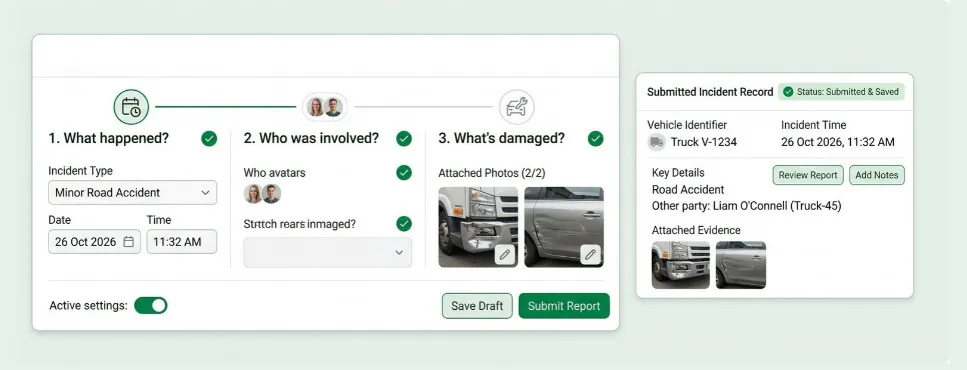
Drivers report incidents in a few taps
Better reports, first time.
The driver app walks drivers through what happened, who was involved and what’s damaged. Simple enough to use when they’re shaken up, thorough enough for your insurer.
What your team can do:
- Crash and damage reports
- Near-miss reports
- Vehicle fault reports
Keep the evidence with the incident
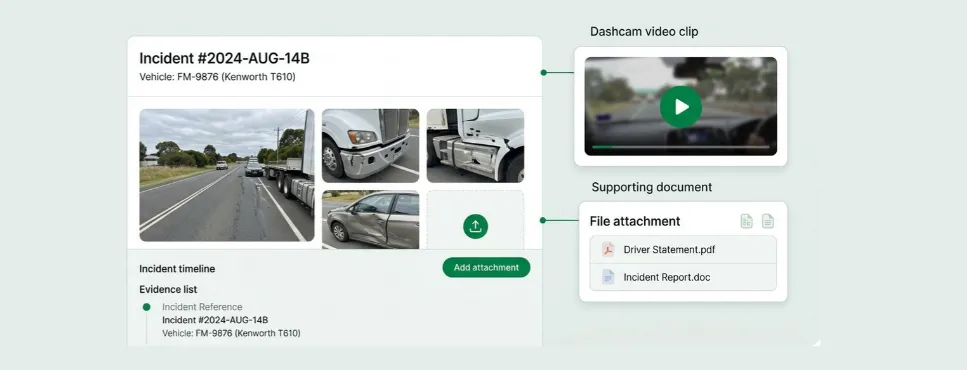
Everything in one place for claims.
Drivers attach photos of the scene, damage and other vehicles straight from the app. Add dashcam clips and documents later, all in one record.
What your team can do:
- Dashcam footage attached
- Documents and notes
- Photos from the scene
Know exactly where and how it happened
Facts, not memories.
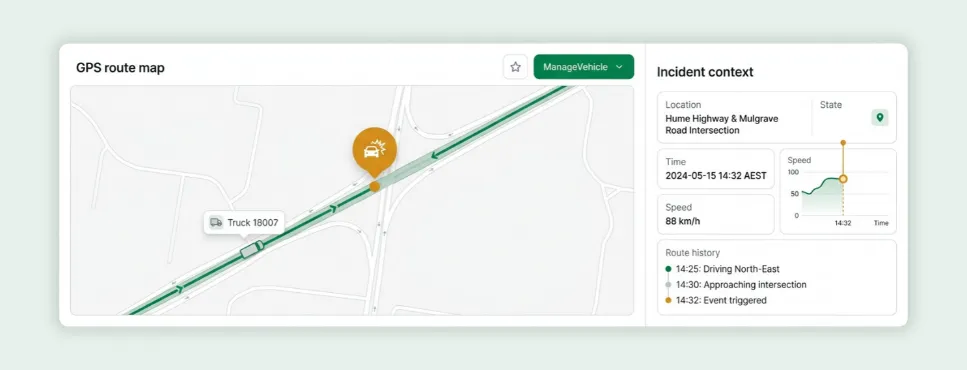
Each incident is linked to the vehicle’s GPS data, so you see the location, time and speed when it happened, plus the route before it.
What your team can do:
- Incident location on the map
- Speed at the time
- Route leading up to it
Track every action until it’s done
Nothing falls through the cracks.
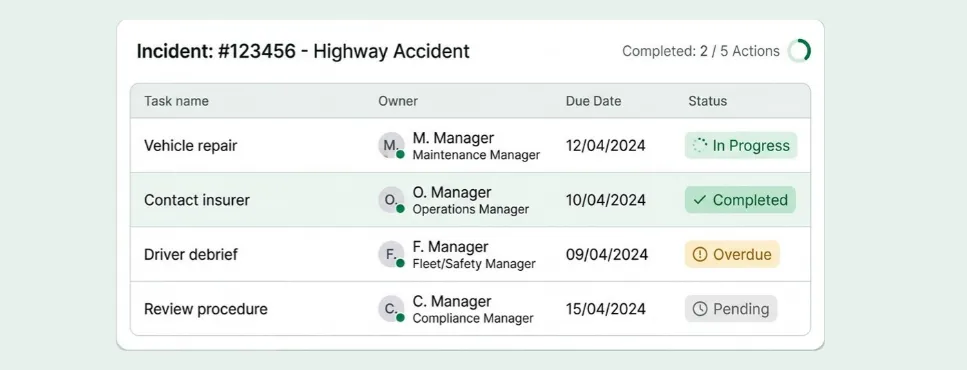
Assign follow-ups like repairs, insurer contact, driver debriefs or procedure changes. See what’s open and what’s overdue.
What your team can do:
- Assign actions to people
- Track open and overdue items
- Close incidents when done
Spot patterns before they become problems
Learn from every incident.
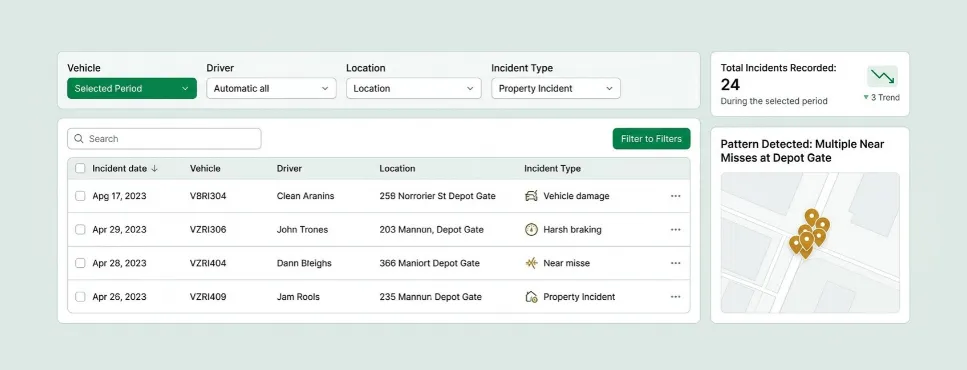
Look back across incidents by vehicle, driver, location or type. Repeat near misses at the same depot gate tell you something needs to change.
What your team can do:
- Filter by driver or vehicle
- Incidents by location and type
- Export for audits and insurers
The first hour after a crash: a checklist for drivers and the office
What happens in the first hour decides how good your evidence is, how fast the claim moves, and whether you can show you acted. Here’s who does what, and where ManageVehicle helps.
At the scene (driver)
-
1. Make it safe
Hazard lights on, check for injuries, and call 000 if anyone is hurt or the road is blocked.
-
2. Call it in
Let your supervisor know as soon as it’s safe.
-
3. Take photos
The scene, the damage, the other vehicles and their number plates, before anything is moved if it’s safe to wait.
In ManageVehicle Photos go straight into the incident report from the app
-
4. Get the details
Names, phone numbers and registration of anyone involved, plus any witnesses.
In ManageVehicle The app walks the driver through who was involved
-
5. Send the report
Submit the report before leaving the scene, while it’s fresh.
In ManageVehicle Location and time are added automatically from GPS
In the office
-
6. Check the facts
Look at where it happened, the speed at the time and the route before it.
In ManageVehicle GPS location, speed and route on the incident record
-
7. Save the footage
Pull the dashcam clip before it’s overwritten.
In ManageVehicle Add the clip to the incident, where a smart dashcam is fitted
-
8. Check hours and fitness
See how long the driver had been working and whether they did a fit-to-drive check.
In ManageVehicle Work and rest records from MV Driver, our NHVR-approved EWD
-
9. Notify who needs to know
Your insurer and, where required, police. If someone was seriously hurt, check whether it’s a notifiable incident for your work health and safety regulator.
In ManageVehicle Export the record for your insurer
-
10. Assign the follow-ups
Repairs, vehicle off the road, insurer contact, a driver debrief and any procedure change.
In ManageVehicle Assign actions to people and track them until the incident is closed
General information only, not legal advice. Notification rules vary by state; see Safe Work Australia to find your regulator.
Stop asking “what happened out there?”
The questions that come after every incident, answered from one record.
Where did the crash happen?
Check the incident location.
How fast was it going?
See the speed at the time.
Do we have photos for the insurer?
Open the attached photos.
Has the repair been booked?
Check the follow-up actions.
Is this the same spot as last time?
Filter incidents by location.
Incident records that show you acted
Under Chain of Responsibility, it’s not enough to record what went wrong. You need to show what you did about it. Time-stamped reports and follow-ups give you that proof. Read our Chain of Responsibility guide.
Reports with time and place
Every incident linked to when and where it happened.
Corrective actions on record
Show each follow-up, who did it and when.
Works next to your EWD
Incidents show what happened. MV Driver, our NHVR-approved EWD, shows the hours worked before it.
Connected incident and fleet operations
Incidents are easier to investigate when the report sits next to video, location, driver hours and maintenance.
-
Incidents + dashcams
Add video to every report
A connected incident record can include
- Event clip
- Road and cab footage
- Speed
- Driver and vehicle
-
Incidents + GPS
Rebuild the moments before
Tracking context can include
- Location
- Speed at the time
- Route before the event
- Stop times
-
Incidents + maintenance
Send damage straight to the workshop
Maintenance workflows can include
- Repair jobs
- Defects
- Vehicle off the road
- Return to service
-
Incidents + EWD
Check hours before the incident
Driver records can include
- Work and rest before the event
- Breaches
- Fit-to-drive check
- Fatigue alerts
-
Reports & insights
Turn incidents into safety reports
Incident reports can include
- Incidents by type
- By driver and vehicle
- By location
- Actions completed
-
Australian fleet operations
Incident management built for Australian fleets
What you get
- Driver app on iOS and Android
- Web and mobile access
- Australian customer support
- Designed for commercial fleets
See how incident reporting works for construction and mining, waste management and council and government fleets.
Paper incident forms vs fleet incident management
A paper form records what someone remembers. Incident management records what actually happened, and what you did next.
Paper incident forms
Filled in after the fact.
- Details from memory
- Photos stored elsewhere
- No location or speed data
- Follow-ups tracked by email
Fleet incident management
Recorded at the scene and tracked to the end.
- Reports from the driver app
- Photos and footage attached
- GPS location and speed
- Assigned follow-up actions
- Searchable incident history
Fleet incident management FAQs
What is fleet incident management?
It’s how you record, investigate and follow up crashes, near misses, damage and vehicle faults. ManageVehicle keeps the report, evidence and actions in one place.
How do drivers report incidents?
Through the driver app on iOS or Android. It guides them through the details and lets them attach photos on the spot.
Can I report near misses too?
Yes. Near-miss reports are quick to make, and they help you spot risks before they turn into crashes.
Can I see where and how fast the vehicle was going?
Yes. Each incident links to the vehicle’s GPS data, including location, time and speed.
Can I attach dashcam footage?
Yes. If the vehicle has a smart dashcam, the clip can be added to the incident record alongside the driver’s photos.
Can I track repairs and follow-up actions?
Yes. Assign actions like repairs, insurer contact or driver debriefs, and track them until the incident is closed.
Does it help with Chain of Responsibility?
Yes. Time-stamped reports and corrective actions help show the reasonable steps you take to manage safety risks.
Can I export incident reports for insurers?
Yes. Incident records, photos and reports can be exported to share with insurers or auditors.
What should a driver do after a crash?
Make the scene safe and call 000 if anyone is hurt, let the supervisor know, take photos, get the details of everyone involved and any witnesses, and send the report from the app before leaving. Our first-hour checklist above covers each step.
What’s the difference between incident and fault reporting?
An incident is something that happened, like a crash, near miss or damage. A fault is something wrong with the vehicle, like a warning light or a failed brake light. Drivers can report both from the app, and faults can go straight to the workshop as a repair job.
Explore more
-
Smart Dashcams
Smart dashcams that record road and cab footage with the location, speed and driver for every event.
Explore Smart Dashcams -
Transport Compliance
Fleet compliance software for HVNL. Keep EWD records, fatigue alerts, maintenance and audit reports in one place, ready when the NHVR asks.
Explore Transport Compliance -
Geofencing & Alerts
Fleet geofencing software that alerts you when a vehicle arrives, leaves or overstays at a depot, site or customer.
Explore Geofencing & Alerts
See incident management on your fleet
In a 30-minute demo, we’ll walk through a real incident from the driver’s report to a closed record, and show you how photos, GPS, footage and follow-ups come together.
- Tailored to your fleet size
- Live answers on CoR and HVNL
- Local Australian support team
See ManageVehicle in action
Tell us a bit about your fleet and we’ll be in touch within one business day.