GPS Fleet Tracking Software for Australian Fleets
Every truck, ute and machine on one live map. ManageVehicle’s GPS fleet tracking shows where each vehicle is, how fast it’s going and where it’s been, right next to your jobs, drivers and work diaries.

- NHVR-approved EWD
- ISO 9001 certified
- Australian support
- Serving fleets since 2021
Still ringing drivers to find out where they are?
Customer’s asking when the delivery gets there.
Was that our truck flying down the Monash?
Did anyone take the ute home last night?
Each of those calls takes a few minutes and pulls a driver’s attention off the road. Real-time fleet tracking answers all three on one screen, without picking up the phone.
How GPS fleet tracking works
GPS fleet tracking is the use of GPS devices in company vehicles to report their location, speed and status to software, so a business can see its whole fleet live and look back at past trips. Standard GPS is accurate to within about 5 to 10 metres, according to Geoscience Australia. That’s plenty to tell which depot, site or street a truck is on.
- Step 1
A tracker in the vehicle
A GPS device, hard-wired or plugged in, reads the vehicle’s position every few seconds.
- Step 2
Sent over the mobile network
Position, speed and ignition status go to ManageVehicle in near real time.
- Step 3
Shown in ManageVehicle
Your team sees it on the web dashboard, alongside jobs, drivers and alerts.
GPS trackers are hardware and are priced separately from your software plan. We’ll quote per vehicle, or connect trackers you already run.
Truck GPS tracking built for heavy vehicles
Most GPS trackers are sold for cars and vans. A truck GPS tracker has more to cope with: vibration, long regional runs, multiple trailers, and drivers who work under the Heavy Vehicle National Law. Here’s what ManageVehicle’s truck tracking adds.
- 01
Hardwired, not plug-in
Hardwired trackers start with the ignition and can’t be unplugged, so you don’t lose a truck’s history halfway through a shift.
- 02
Engine data, not just a dot
Supported trackers read engine hours, odometer and fault codes, so services are due on real kilometres and faults show up early.
- 03
Trailers on the same map
Track prime movers, trailers, dollies and plant in one place. See our trailer and asset tracking guide.
- 04
Checked against the work diary
Vehicle movement sits next to drivers’ hours in MV Driver, our NHVR-approved electronic work diary, so you can check one against the other.
A day of fleet tracking, from first start to lock-up
-
6:05 am
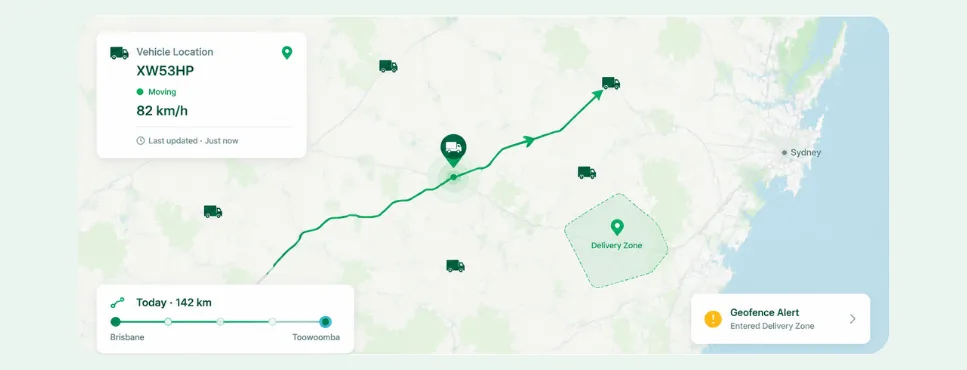
See who’s left the depot
Every vehicle shows its status on the live map: moving, idling or parked. You know who’s on the road before the first customer calls.
-
9:30 am
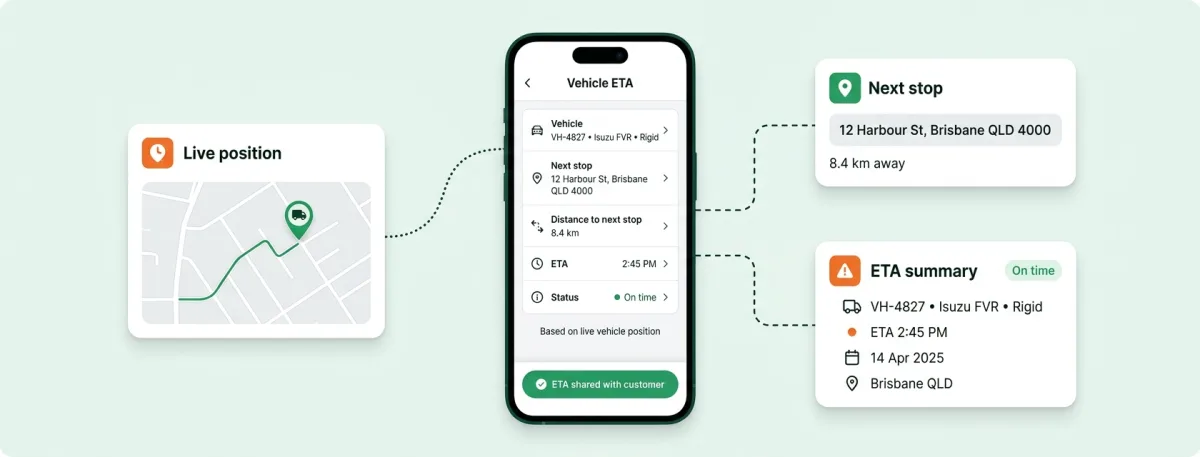
Give customers an honest ETA
A customer wants to know when their load arrives. Click the vehicle, see where it is and how far it has to go, and give them a real answer.
-
12:15 pm
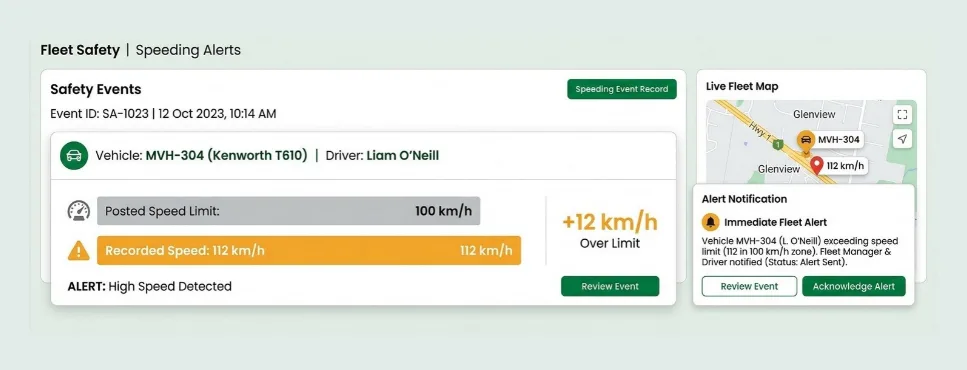
Catch speeding the same day
A truck goes over the speed threshold you set. The driver hears an in-cab alert and you get a safety event with the time and place.
driver behaviour monitoring -
3:00 pm
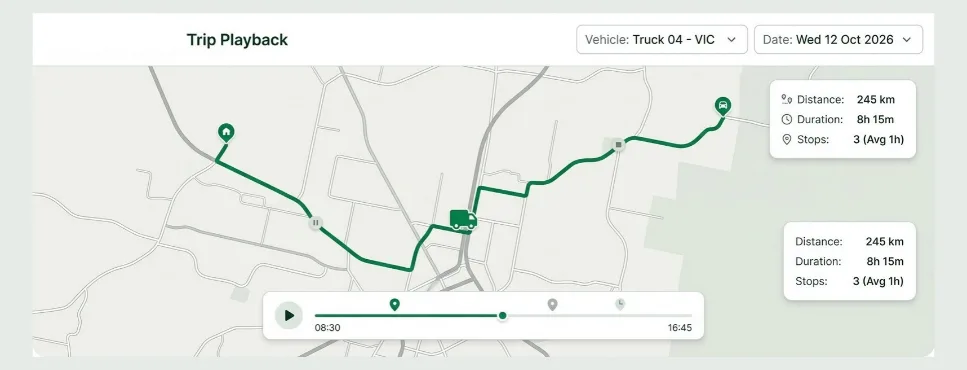
Settle “I was there at nine”
A site says your driver turned up late. Replay the morning’s trip and check the arrival time on the map.
vehicle route history -
5:30 pm
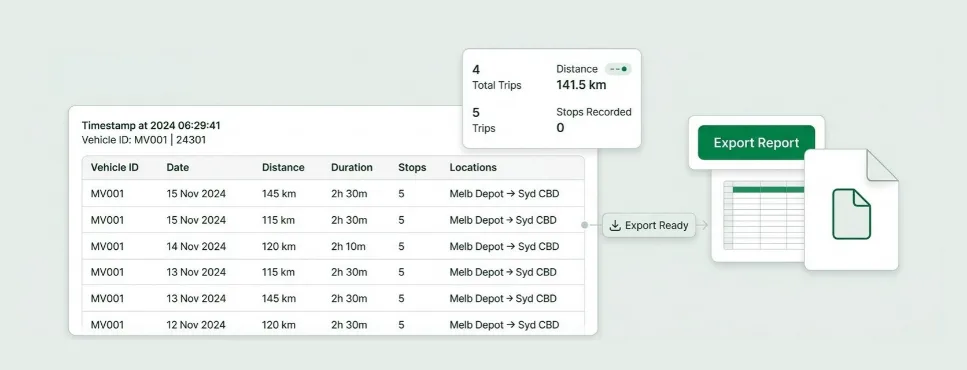
Send the day’s distance report
Kilometres travelled, time on site and idle time per vehicle, ready to export.
-
10:40 pm
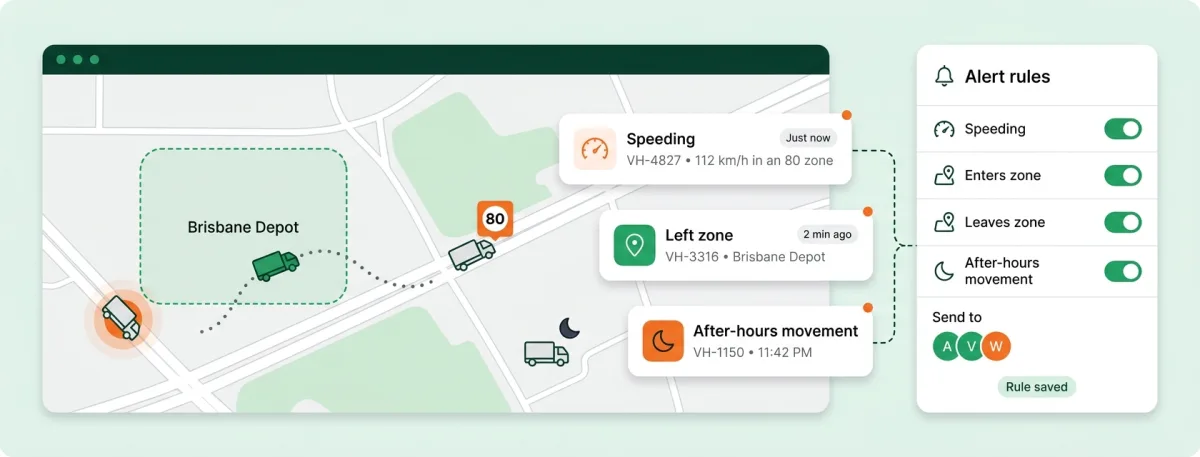
Know when something moves after hours
A ute leaves the yard at night. You get an alert straight away, not a surprise in the morning.
geofence alerts
One GPS record that every team uses
Fleet GPS tracking isn’t just for dispatch. The same location record backs up your safety, compliance, workshop and office work.
-
Jobs and vehicles on one map (Dispatch)
Send the nearest free driver to the urgent run.
Job Dispatch -
Clips matched to the spot (Safety)
Dashcam footage with the exact location and speed.
Smart Dashcams -
Hours checked against real movement (Compliance)
Check work diary entries against when the vehicle actually moved.
Electronic Work Diary -
Service on real kilometres (Workshop)
Service reminders based on actual distance, not guesses.
Fleet Maintenance -
Trips turned into reports (Office)
Distance, utilisation and site visit reports.
Compliance Reporting
Truck tracking software looks different in every operation. See how it works for transport and logistics, construction and mining, trade and services and councils.
Use your existing trackers, or let us fit new ones
Already have GPS units in your trucks?
ManageVehicle connects to supported devices, so you don’t have to start again.
Need hardware?
We’ll recommend units for trucks, light vehicles or plant, and quote them up front.
Want ballpark numbers first? Read our GPS tracking cost breakdown.
- Teltonika
- Stonkam
- Jimi IoT
- Digital Matter
- GPSWox
Fleet tracking for small businesses
You don’t need a big fleet to get value from GPS tracking. With a handful of utes or trucks, tracking answers the daily “where are you?” calls, shows after-hours use, and backs you up when a customer disputes a time. ManageVehicle is priced per vehicle, with unlimited drivers and office users, so a five-vehicle business gets the same platform as a large fleet. Start small and add vehicles as you grow.
How G & V Logistics keeps every load visible
G & V Logistics needed to know where loads were without calling drivers, and to get evidence to insurers quickly after an incident. With ManageVehicle’s fleet tracking software, the office sees every load live. When something happens on the road, location and footage are ready to send the same day.
Solutions used- GPS Fleet Tracking
- Smart Dashcams
- Incident Management
“Manage Vehicle has made a huge difference for us. The real-time tracking and driver safety features are spot on. We’ve had fewer incidents, and everything runs smoothly. The support team is always there when we need them.”
Standalone truck tracking vs fleet GPS tracking in ManageVehicle
| Feature | Standalone tracker app | ManageVehicle |
|---|---|---|
| Live location | Yes | Yes |
| Trip replay | Usually | Yes |
| Linked to jobs and POD | No | Yes |
| Linked to work diaries (EWD) | No | Yes |
| Service reminders by real km | No | Yes |
| Dashcam clips on the map | No | Yes, with supported cameras |
| Australian support | Varies | Yes |
Not sure whether you need live or logged tracking? See real-time vs passive GPS tracking.
Is it legal to track work vehicles in Australia?
Yes, but each state has its own workplace surveillance rules, and some require written notice before tracking starts. Tell drivers what’s tracked and why, and keep it to work use. Done properly, vehicle tracking software protects drivers too, by backing them up when a complaint isn’t true. Our guide to vehicle tracking laws by state covers the details.
GPS fleet tracking FAQs
What is GPS fleet tracking?
GPS fleet tracking uses a GPS device in each vehicle to send its location, speed and ignition status to software. In ManageVehicle, you see every vehicle on a live map, replay past trips and get alerts, with location linked to jobs, drivers and work diaries.
How often does the map update?
Vehicles report their position every few seconds while moving, so the live map stays close to real time. The exact interval depends on the tracker and your settings.
Do I need to buy new GPS hardware?
Not always. ManageVehicle works with supported trackers, so many fleets connect devices they already own. If you need new units, we’ll recommend hardware for your vehicle types and quote it separately from the software plan.
Can I track utes, trailers and machinery as well as trucks?
Yes. Light vehicles, heavy vehicles and plant can all sit on the same map, so you see the whole fleet in one place instead of switching between systems.
Do drivers need to know they’re being tracked?
Yes, they should, and in some states you must tell them in writing before tracking starts. Most fleets explain what’s tracked and why during induction. GPS records often help drivers too, by backing them up when a complaint isn’t accurate.
Is GPS tracking the same as an electronic work diary?
No. GPS tracking records where and when a vehicle moved. An electronic work diary records a driver’s work and rest hours for the HVNL. ManageVehicle runs both, so you can check diary entries against real vehicle movement.
How much does GPS fleet tracking cost in Australia?
There are two parts: the tracker hardware, plus a monthly software fee per vehicle. Our 2026 cost breakdown explains typical ranges. For an exact quote, book a demo and tell us your fleet size and vehicle types.
Is there free GPS fleet tracking software?
Some apps track phones or a single vehicle for free, but business fleet tracking needs a tracker in each vehicle and a platform behind it, so there’s usually a monthly fee. What you’re paying for is reliable data, history you can keep, alerts, and links to jobs, maintenance and compliance.
What is the best GPS tracker for trucks?
A hardwired tracker that reads engine data, survives heavy vehicle vibration, works on regional routes, and connects to your fleet management software. ManageVehicle works with trackers from Teltonika, Stonkam, Jimi IoT, Digital Matter and GPSWox, and can recommend units for your trucks.
Is fleet tracking worth it for a small business?
Usually, yes. Even with a few vehicles, tracking cuts time spent on calls, shows after-hours use, and gives you evidence when a customer disputes a time. ManageVehicle is priced per vehicle with unlimited users, so it scales with you.
What’s the difference between a vehicle tracking system and fleet management software?
A vehicle tracking system shows where vehicles are. Fleet management software adds maintenance, fuel, drivers, compliance and reporting. ManageVehicle does both. See our fleet management software page.
Keep exploring
-
Vehicle Route History
Replay any trip and settle disputes about where a vehicle was.
Explore Vehicle Route History -
Geofence Alerts
Get told when vehicles arrive, leave or overstay at a site.
Explore Geofence Alerts -
Driver Behaviour Monitoring
Speeding and harsh driving events you can coach on.
Explore Driver Behaviour Monitoring
See your own fleet on the map
In a 30-minute demo, we’ll set up a live map with your vehicle types and show you how alerts, trip replay and reports work for your operation.
- Tailored to your fleet size
- Live answers on HVNL and EWD
- Local Australian support team
See ManageVehicle in action
Tell us a bit about your fleet and we’ll be in touch within one business day.