Job dispatch software that gets jobs out and POD back
Create a job, send it to the right driver and watch it move from pickup to proof of delivery. ManageVehicle’s job dispatch software keeps your office, drivers and customers on the same page.

- NHVR-approved EWD
- ISO 9001 certified
- Serving fleets since 2021
The headaches we hear about most
What changes when jobs stop living in text messages and phone calls.
Before ManageVehicle
- Jobs sent by text, call and sticky note
- No idea if the job has started until someone rings
- Paper dockets lost or unreadable
- Customers asking for ETAs and nobody knows
- Invoicing held up waiting for paperwork
After ManageVehicle
- Jobs sent straight to the driver app with all the details
- Live job status from accepted to delivered
- Digital POD with signature, photos and time stamp
- Arrival times you can estimate from where the vehicle actually is
- Completed jobs and POD ready to bill the same day
What is job dispatch software?
Job dispatch software lets you create jobs, assign them to drivers and vehicles, and track each one through to completion and proof of delivery.
- 01
Create job
Pickup, drop-off, customer and notes.
- 02
Assign
Pick the driver and vehicle.
- 03
Driver app
Driver accepts, updates and completes.
- 04
POD and records
Signature, photos and time, saved to the job.
From a new job to a signed POD
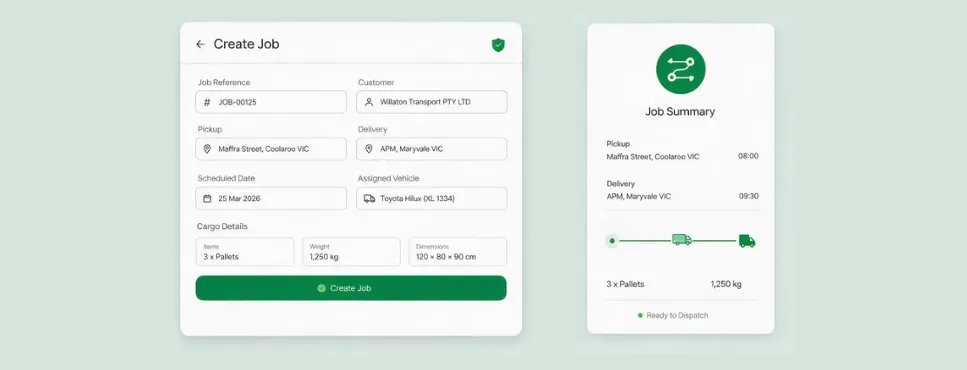
Build a job in under a minute
Every job detail in one place, ready to send.
Add the pickup, drop-off, customer, load and site notes, then save it as a template for runs you do often. Drivers get everything they need on their phone, without a follow-up call.
What your team can do:
- Pickup and drop-off details
- Load and site notes
- Reusable job templates
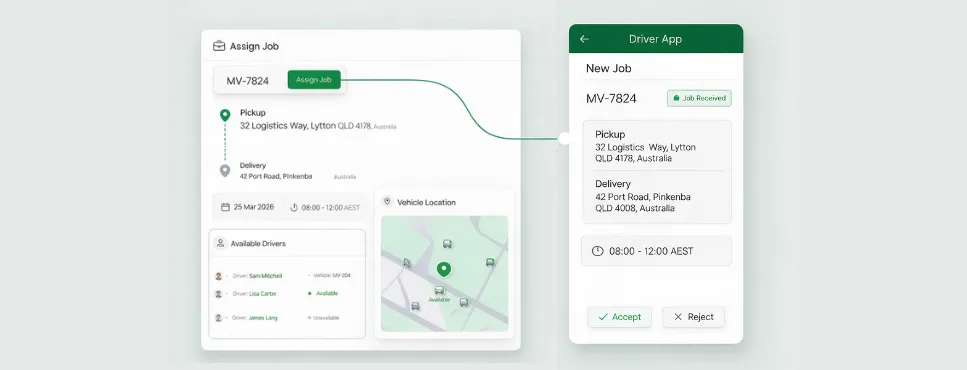
Send the job to the right driver
No more calls to hand out work.
See which drivers and vehicles are free and where they are, then assign the job. It lands in the driver dispatch app straight away.
What your team can do:
- Assign by driver and vehicle
- See who’s nearby and available
- Reassign if plans change
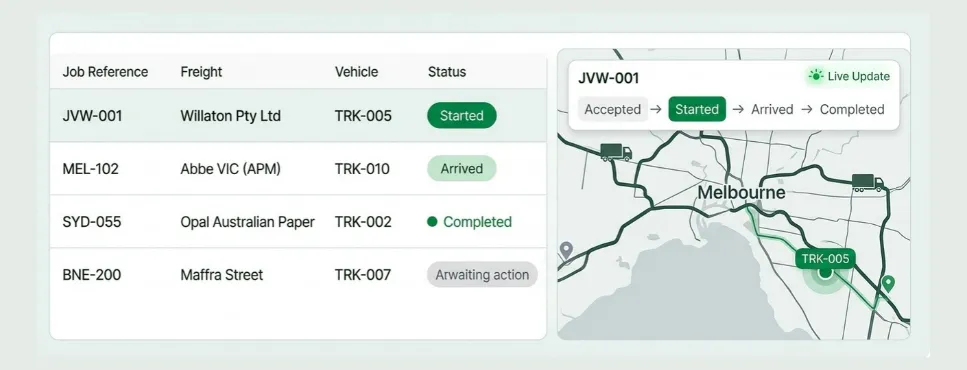
Know where every job is up to
Fewer calls, faster answers for customers.
Drivers update job status as they go: accepted, started, arrived, completed. Your office sees progress live on the same screen as the vehicle’s location.
What your team can do:
- Status updates from the driver
- Live location next to each job
- Spot jobs running late
Capture POD on the spot
Proof that’s hard to argue with.
Drivers collect a signature and photos on the phone at delivery. The time and location are added automatically, so disputes are settled with facts.
What your team can do:
- Signatures on the phone
- Photos of the load and site
- Time and location stamped
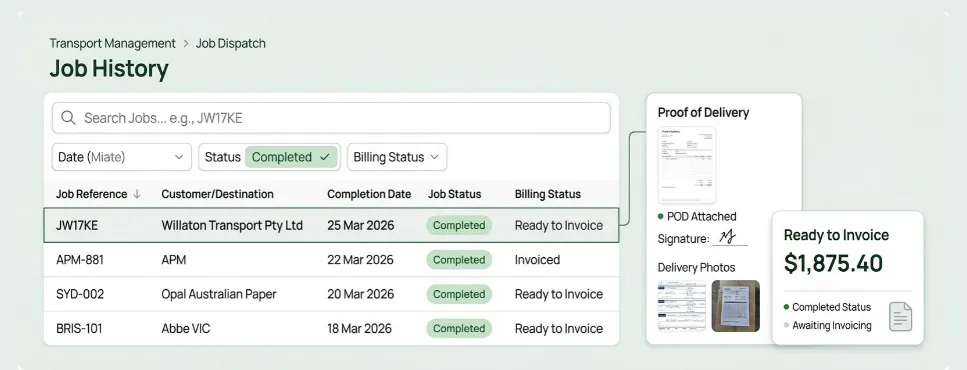
Every job, searchable and ready to bill
Faster billing, easier lookups.
Completed jobs and POD sit together, so accounts can invoice the same day and you can look up any past job in seconds.
What your team can do:
- Search by customer, driver or date
- POD attached to every job
- Export for invoicing
One job, from order to invoice
Follow a single job through ManageVehicle, from the moment the customer calls to the moment accounts sends the invoice. Each step shows who does it and what’s recorded.
-
New
OfficeThe customer books a pickup. The job is created from a template with the pickup, drop-off, load and site notes.
What’s recordedJob details and customer -
Assigned
OfficeThe dispatcher checks who’s nearby and has the hours available, then assigns the driver and vehicle.
What’s recordedDriver, vehicle and time assigned -
Accepted
DriverThe job lands in the driver app. The driver reads the notes and accepts it.
What’s recordedDriver acceptance and time -
Started and arrived
DriverThe driver marks the job started. When the truck enters the customer’s site geofence, the arrival is logged automatically, and so is the time spent waiting. The office sees each update next to the truck’s live location.
What’s recordedStatus times, arrival and wait times, location -
Completed
DriverThe customer signs on the phone and the driver takes photos of the load.
What’s recordedSignature, photos, time and location (POD) -
Ready to invoice
AccountsThe completed job and its POD are together, so accounts can invoice the same day.
What’s recordedJob history, exportable for invoicing
Want to know how many hours a driver has left before you assign them? Dispatch works next to MV Driver, our NHVR-approved EWD.
Live Operation Reality Check: every job, live, on one screen
Turn on Live Operation Reality Check and your dispatchers see the whole day’s work as it happens. Every job, every driver and every vehicle, with the status of each, in one live view. No ringing around to find out where things are up to.
Job status
Where every job is up to, from assigned to delivered.
Driver status
Who’s on a job, who’s free, and who’s on a break.
Vehicle status
Where each vehicle is and whether it’s moving.
Safety checks
Which pre-start checks are done, and which aren’t.
Proof of delivery
Which jobs have POD captured, and which are still waiting.
Arrival times and ETA
When each job arrived at its destination, and the arrival ETA for jobs still on the road.
Built for dispatchers who need the real picture, not the plan. Book a demo to see it on your own jobs.
Stop asking “has the delivery been done?”
The questions your dispatchers field all day, answered on one screen.
Has Job 4127 been picked up?
Check the job status.
When will it get to the customer?
See the arrival ETA.
Who’s free for an urgent run?
View available drivers nearby.
Did the customer sign for it?
Open the POD.
Can we invoice yesterday’s jobs?
Export completed jobs.
Job records that keep schedules realistic
Under Chain of Responsibility, schedulers and loading managers have duties too. Clear job records show your schedules gave drivers enough time to work safely and legally. Read about scheduler fatigue duties under the HVNL.
Realistic schedules on record
See planned vs actual times for every job.
Time-stamped POD
Prove when and where each delivery was completed.
Works next to your EWD
Jobs show the work planned. MV Driver, our NHVR-approved EWD, shows the hours actually worked.
Connected dispatch and fleet operations
Dispatch works better when it’s linked to tracking, compliance and the rest of your fleet data.
-
Dispatch + GPS
See jobs and vehicles on one map
A live job view can include
- Vehicle location
- Job status
- Arrival ETA
- Arrival time
-
Dispatch + geofencing
Log arrival and wait times at the customer’s gate
Geofence events can include
- Arrival at site
- Time on site
- Departure
- Overstay alerts
-
Dispatch + EWD
Plan work around driver hours
Driver records can include
- Work and rest times
- Hours available
- Breaks taken
- Fatigue alerts
-
Dispatch + POD
Close out jobs with proof
A connected delivery record can include
- Driver and vehicle
- Delivery date and time
- Location
- Signature and photos
-
Reports & insights
Turn jobs into performance reports
Job reports can include
- Jobs completed
- Jobs by driver
- Time on site
- Jobs by customer
-
Australian fleet operations
Dispatch built for Australian fleets
What you get
- Web and mobile access
- Driver app on iOS and Android
- Australian customer support
- Designed for transport operators
Job dispatch vs a full transport management system
Transport dispatch software handles the job. A transport management system handles the wider operation around it.
Job dispatch
Focuses on getting each job done and proven.
- Create and assign jobs
- Driver app updates
- Live job status
- Proof of delivery
Transport management with ManageVehicle
Delivery management software that includes dispatch and connects it to the rest of the fleet.
- Jobs and POD
- GPS tracking and geofences
- EWD and fatigue records
- Maintenance and compliance
- Reports across the operation
From end-of-week invoicing to invoices in 15 minutes
Veera Transport used to manage jobs, PODs and invoicing in batches, waiting until the end of the week to collect the paperwork and send invoices. Now jobs are allocated in ManageVehicle, the driver’s approval is captured, PODs are recorded on the phone, and the invoice goes to the client within 15 minutes of the job being completed. The result is faster invoicing, faster payment and better cash flow.
Job dispatch software FAQs
What is job dispatch software?
It lets you create jobs, assign them to drivers and track them through to proof of delivery. Used as truck dispatch software, ManageVehicle connects each job to the vehicle’s live location and the driver’s records.
How do drivers receive jobs?
Jobs go straight to the driver app on iOS or Android, with addresses, customer details and notes.
Can drivers capture proof of delivery?
Yes. The driver app works as a proof of delivery app, so drivers collect signatures and photos on their phone, and the time and location are added automatically.
Can I see job progress live?
Yes. Drivers update the status as they go, and where the customer’s site is set up as a geofence, arrival and wait times are logged automatically. Your office sees it all next to the vehicle’s live location.
Can I give customers an ETA?
Yes. Live Operation Reality Check shows every job in one live view, including the driver and vehicle status, safety check and POD status, and each job’s arrival ETA, so you can answer customers straight away.
Can I reassign a job if plans change?
Yes. Move a job to another driver or vehicle and it updates on their app.
Does dispatch help with fatigue compliance?
It works like driver scheduling software with fatigue in view, so your schedulers plan realistically. Seeing driver hours from the EWD next to the job list makes it easier to avoid pushing drivers past their limits.
Can I export completed jobs for invoicing?
Yes. Completed jobs with POD can be exported, so billing doesn’t wait on paperwork.
What is a proof of delivery app?
An app the driver uses to record that a delivery was completed, usually with the customer’s signature, photos, and the time and location. In ManageVehicle, POD is part of the driver app and saved straight to the job, so there’s no paper docket to lose.
Is it suitable for small transport businesses?
Yes. Small fleets use it to stop handing out work by text and chasing paper dockets. You can start with a few vehicles and add more as you grow.
What is Live Operation Reality Check?
It’s a live view of all your jobs for dispatchers. When it’s turned on, it shows each job’s status alongside the driver’s status, the vehicle’s status, safety check status, POD status, the destination arrival time and the arrival ETA, all on one screen.
Can I see how long drivers wait at customer sites?
Yes. Where a customer’s site is set up as a geofence, ManageVehicle logs when the truck arrived and left, so you have a record of waiting time for each job.
Explore more
-
GPS Fleet Tracking
GPS fleet tracking software with a live map, trip replay and speed and after-hours alerts for every vehicle.
Explore GPS Fleet Tracking -
Geofencing & Alerts
Fleet geofencing software that alerts you when a vehicle arrives, leaves or overstays at a depot, site or customer.
Explore Geofencing & Alerts -
Electronic Work Diary (EWD)
MV Driver, our NHVR-approved electronic work diary, records work and rest on the driver’s phone with fatigue alerts and audit-ready records.
Explore Electronic Work Diary (EWD)
See job dispatch on your fleet
In a 30-minute demo, we’ll create a job, send it to a driver app, capture a POD and show you the finished job ready to invoice.
- Tailored to your fleet size
- Live answers on HVNL and EWD
- Local Australian support team
See ManageVehicle in action
Tell us a bit about your fleet and we’ll be in touch within one business day.