Vehicle route history for every trip your fleet makes
Replay any trip, see every stop and check the speed on every stretch of road. ManageVehicle keeps vehicle route history ready for the day a customer, insurer or the NHVR asks what happened.

- NHVR-approved EWD
- ISO 9001 certified
- Serving fleets since 2021
The headaches we hear about most
What changes when every trip leaves a clear trail.
Before ManageVehicle
- “I was there at 9” vs “No you weren’t”
- Unexplained kilometres on the odometer
- Insurer asks where the truck was, and you can’t say
- Timesheets that don’t match the work
- Weeks of digging when an auditor asks
After ManageVehicle
- The exact arrival time, on the map
- Every trip and detour you can replay
- Location and speed at any moment, a few clicks away
- Stops and trip times to check against hours claimed
- Trip history filtered by vehicle and date in seconds
What is vehicle route history?
Vehicle route history is the saved record of every trip a vehicle made: the path it took, where it stopped, for how long and how fast it was going.
- 01
GPS device
Records position, time and speed.
- 02
Network
Sends each point to the platform.
- 03
ManageVehicle
Joins the points into trips and stops.
- 04
History and playback
Replay, review and export any day.
From a single GPS point to the full story of the day
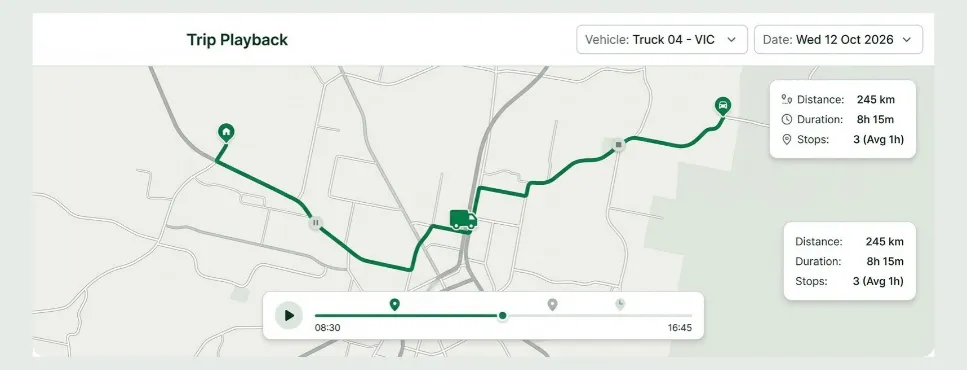
Replay any trip on the map
See exactly how the day unfolded.
Pick a vehicle and a date, then watch the trip play back from start to finish. See the route taken, the turns made and where time was spent.
What your team can do:
- Replay by vehicle and date
- Pause on any point
- See the full route taken
Every stop, with times and duration
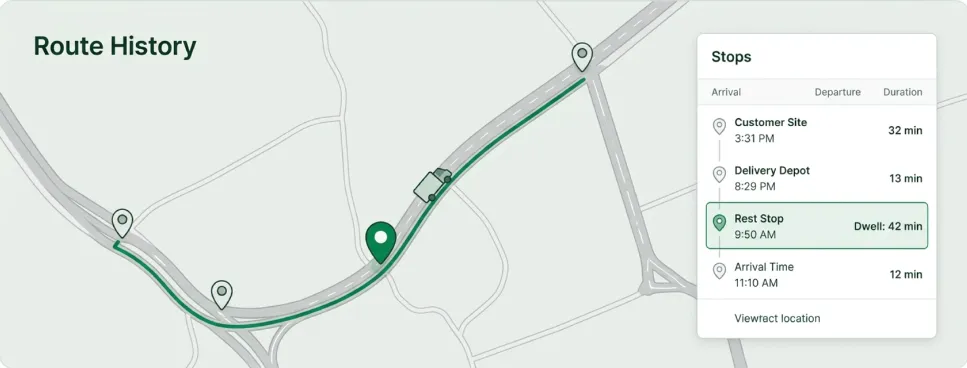
Know where the time actually went.
Route history marks where each vehicle stopped, when it arrived and how long it stayed. Perfect for checking deliveries, breaks and long waits at customer sites.
What your team can do:
- Stop locations and times
- Duration at each stop
- Spot unplanned stops
Check speed on every stretch of road
Speed in context, not just a number.
See the vehicle’s speed at any point in the trip, along with speeding events. Useful for coaching, incident reviews and insurance questions.
What your team can do:
- Speed at any point
- Speeding events on the route
- Compare trips over time
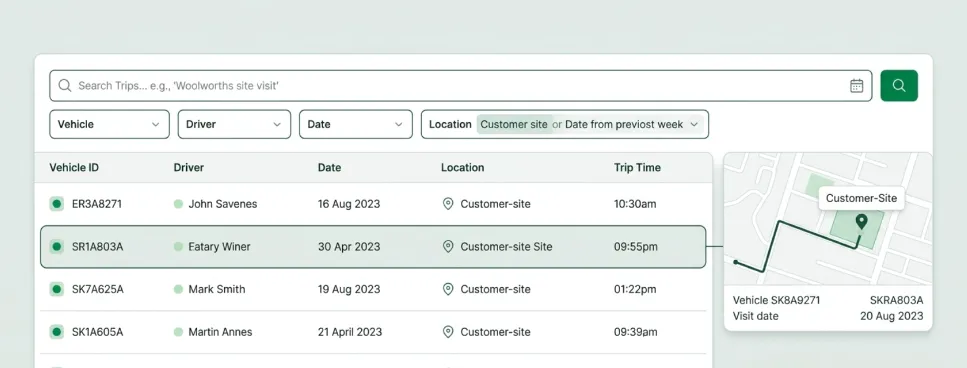
Find the trip you need in seconds
Quick answers from months of data.
Filter by vehicle, driver, date or location. Answer “was anyone at this site last Tuesday?” without scrolling through days of data.
What your team can do:
- Filter by vehicle and date
- Search by location
- Review trips by driver
Turn trips into records you can share
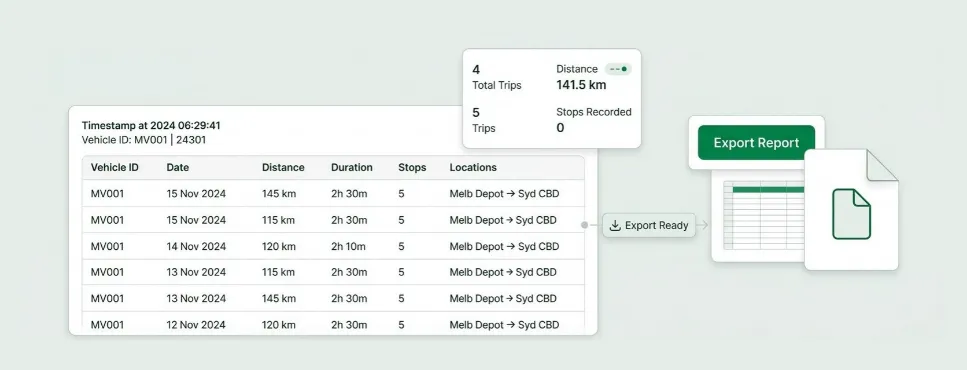
Evidence that’s ready to hand over.
Export trip and stop reports for customers, insurers, payroll or audits. The data comes straight from the vehicle, so there’s no retyping.
What your team can do:
- Trip and stop reports
- Distance travelled reports
- Export for audits and claims
Five disputes route history settles, and where to look
Most questions about the past start with someone’s word against someone else’s. Here’s what people usually say, what to check in ManageVehicle, and what the record shows.
-
The late delivery
What they say“Your truck didn’t turn up until after 11.”
What to checkThe stop at the customer’s address
What it showsThe arrival time, and how long the truck stayed on site
-
The extra kilometres
What they say“Why is this ute doing 200 km more a week than the others?”
What to checkTrip playback for the week
What it showsEvery route taken, including detours and after-hours trips
-
The timesheet
What they say“I was on site from 6 till 4.”
What to checkStops and trip times for the day
What it showsWhen the vehicle arrived, left and moved between sites
-
The insurance claim
What they say“We were doing the limit when it happened.”
What to checkSpeed at the time, and the route before
What it showsThe speed and position in the minutes leading up to the event
-
The site visit
What they say“Nobody came to fix it last Tuesday.”
What to checkSearch by location and date
What it showsWhich vehicles were at the site, and when
Preparing for an audit instead? Read how to read vehicle location history for a compliance audit.
Stop asking “where was it last Tuesday?”
Route history answers questions about the past as easily as the map answers questions about now.
What time did Truck 7 get to site?
Check the stop time.
Why are there extra kilometres?
Replay the trip.
How fast was it going at 3:10pm?
Check speed at that point.
Was anyone at this site last week?
Search by location.
How far did the fleet travel this month?
Open the distance report.
Location records you can actually use when the NHVR asks
Every trip, stop and speed event is stored with a time and place, giving you a clear record of the reasonable steps you’ve taken under Chain of Responsibility.
Trip records on any day
Pull up where a vehicle was and how it was driven, for any date.
Speed records by driver and time
See speeding events over your set threshold, with time and place.
Works next to your EWD
Route history shows where. MV Driver, our NHVR-approved EWD, records work and rest. Both in one place.
Connected route history and fleet operations
Trip records become more useful when they sit next to jobs, incidents, footage and driver hours.
-
History + jobs
Back up every delivery with a trip
A connected job record can include
- Arrival and departure
- Time on site
- Route taken
- POD, signature or photos
-
History + dashcams
Match footage to the route
A connected safety record can include
- Dashcam footage
- Location
- Speed at the time
- Driver and vehicle
-
History + incidents
Rebuild what happened
An incident review can include
- Route before the event
- Speed and braking
- Stop times
- Photos and reports
-
History + EWD
Check hours against movement
Driver records can include
- Work and rest periods
- Trip start and end
- Breaks taken
- Location of rests and stops
-
Reports & insights
Turn trips into fleet reports
Trip reports can include
- Distance travelled
- Stops and dwell time
- Speed events
- Utilisation
-
Australian fleet operations
Route history built for Australian fleets
What you get
- Web and mobile access
- Designed for commercial fleets
- Australian customer support
- Supported GPS devices
Live GPS tracking vs route history
Live tracking answers “where is it now?”. Route history answers “where was it, and what happened?”
Live GPS tracking
Focuses on the vehicle’s position right now.
- Live map
- Current speed
Route history
Keeps the record of everything that already happened.
- Trip playback
- Stops and dwell times
- Speed at any point
- Search by date and location
- Exportable reports
Vehicle route history FAQs
What is vehicle route history?
It’s the saved record of every trip a vehicle makes, including the route, stops, times and speed. ManageVehicle lets you replay, search and export it.
Can I replay a past trip?
Yes. Pick the vehicle and date and play the trip back on the map from start to finish.
Can I see where vehicles stopped and for how long?
Yes. Each stop shows its location, arrival time and how long the vehicle stayed.
Can I see how fast a vehicle was going at a certain time?
Yes. Speed is recorded along the route, so you can check any point in the trip and see speeding events.
How can route history help with disputes?
Time-stamped arrivals, stops and routes give you facts to settle delivery, timesheet and billing disputes quickly. See the five disputes above.
Is route history useful for compliance?
Yes. Trip and speed records help show the reasonable steps you take under Chain of Responsibility, and they work well next to your EWD records.
Can I export trip reports?
Yes. Export trip, stop and distance reports for customers, insurers, payroll or audits.
Does route history work with my existing GPS devices?
If your devices are supported by ManageVehicle, yes. Talk to us during the demo about the hardware you already have.
What’s the difference between route history and GPS tracking?
GPS tracking shows where a vehicle is right now. Route history is the saved record of where it has been: the path, stops and speed for any past trip. ManageVehicle does both from the same tracker.
Can I check where a vehicle was outside work hours?
Yes. Route history covers every trip the tracker records, including after hours, so you can see if a work vehicle was used when it shouldn’t have been. If staff use vehicles privately, tell them about tracking first; our guide to the legal side of vehicle tracking covers the basics.
How long is route history kept?
Five years or more by default, and the period can be configured to suit your business and your record-keeping needs.
Explore more
-
GPS Fleet Tracking
GPS fleet tracking software with a live map, trip replay and speed and after-hours alerts for every vehicle.
Explore GPS Fleet Tracking -
Driver Behaviour
Speeding and harsh driving alerts with the time, place and driver for every event, so you can coach drivers with real data.
Explore Driver Behaviour -
Smart Dashcams
Smart dashcams that record road and cab footage with the location, speed and driver for every event.
Explore Smart Dashcams
See route history on your fleet
In a 30-minute demo, we’ll replay a real trip, show you the stops and speed along the way, and export the report you’d send to a customer or insurer.
- Tailored to your fleet size
- Advice on the right trackers
- Local Australian support team
See ManageVehicle in action
Tell us a bit about your fleet and we’ll be in touch within one business day.