NHVR-Approved Electronic Work Diary (EWD) App for Heavy Vehicle Drivers
MV Driver is ManageVehicle’s electronic work diary, approved by the NHVR in September 2026. Drivers record work and rest on their phone, get warned before a breach and stop worrying about paper pages.

Included free in every ManageVehicle plan
- NHVR approved EWD
- ISO 9001 certified
- Serving Australian fleets since 2021
The headaches we hear about most
What changes when the work diary moves from paper to a phone.
Manual, fragmented and reactive
- Counting rest breaks by hand at the end of a shift
- Breaches spotted after they’ve happened
- Messy handwriting and missing pages at a roadside check
- Collecting paper diaries from every driver
- Hours of paper checking before an audit
Connected, live and proactive
- Work and rest totals worked out automatically
- A warning before a driver runs out of hours
- Clean, readable records on the driver’s phone
- Records sent to the office automatically
- Work and rest history searchable by driver and date
What is an electronic work diary?
An electronic work diary (EWD) is an NHVR-approved app that records a heavy vehicle driver’s work and rest times digitally, in place of the paper written work diary.
-
01
Driver
Starts work and records rest in MV Driver.
-
02
MV Driver app
Tracks hours and warns before a breach.
-
03
ManageVehicle
Stores records for the record keeper.
-
04
Compliance records
Ready for roadside checks and audits.
Who needs a work diary?
Drivers working under Standard hours generally need a work diary when they work more than 100 km from their base, and drivers working under BFM, AFM or exemption hours need one regardless of distance. An EWD is optional: it replaces the paper written work diary, and it isn’t an extra requirement. For the full picture, read our complete guide to fatigue management.
An electronic work diary that’s on the NHVR’s approved list
MV Driver is on the NHVR’s approved EWD register. Penalties for fatigue and work diary breaches went up under the amended HVNL, so accurate work and rest records matter more than ever.
- Product
- MV Driver
- Certificate
- MANV-2026-001
- Approved
- September 2026
-
NHVR approved since September 2026
MV Driver is approved as an EWD under the Heavy Vehicle National Law.
-
Breaches caught before they happen
Warnings help drivers stay inside their hours.
-
Records ready for audits
Search, review and export work and rest history in minutes.
Product experience
From the first tap of the shift to an audit-ready record.
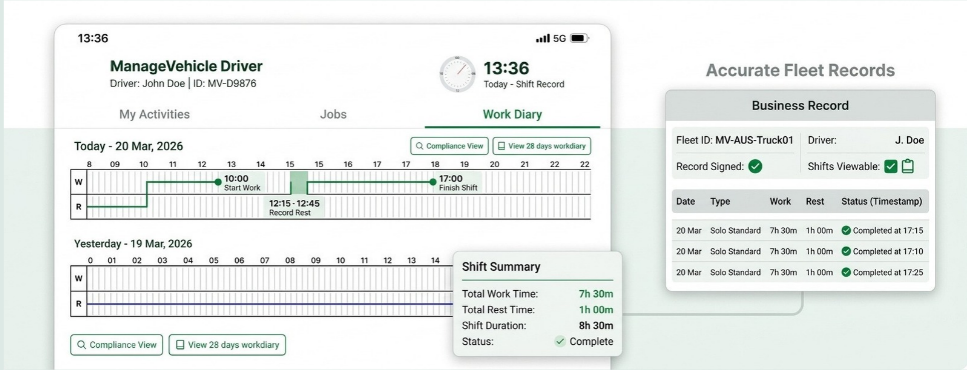
Work and rest recorded with a few taps
Simple for drivers, accurate for the business.
Drivers start work, take breaks and finish the shift in MV Driver. The app does the time maths, so there’s no adding up on the back of a page.
What your team can do- Start and end work in the app
- Record rest breaks
- Automatic totals for the shift
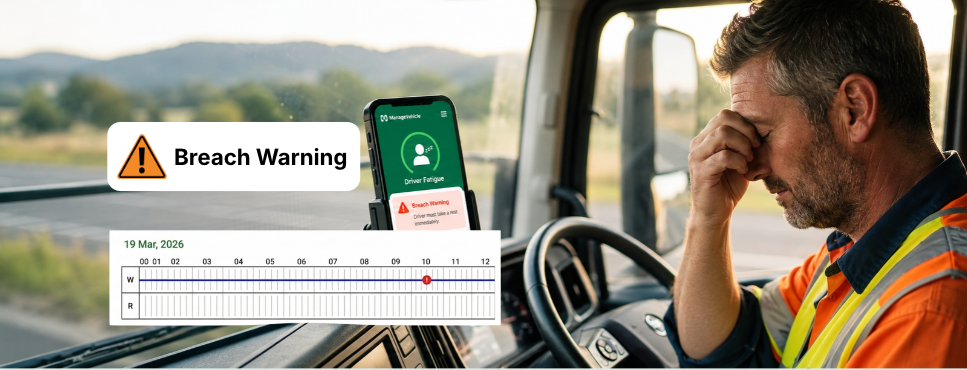
Warn drivers before they run out of hours
Prevent breaches instead of explaining them.
MV Driver shows how much work time is left before the next required rest. Drivers get a heads-up before a breach, not a surprise after one.
What your team can do- Time remaining before rest
- Warnings before a breach
- Clear view of upcoming rest
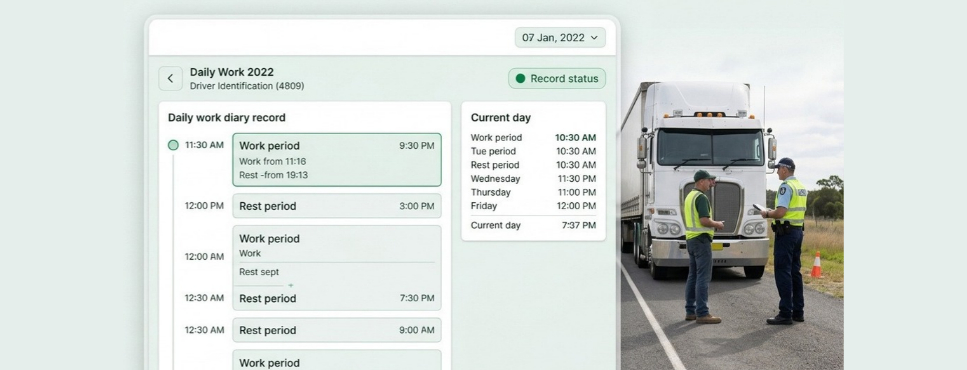
Clean records when an officer asks
Less stress at the side of the road.
When an authorised officer asks to see the work diary, the driver shows it on the phone. Records are neat, complete and easy to read.
What your team can do- Records shown on the phone
- Readable, complete entries
- No lost or damaged pages
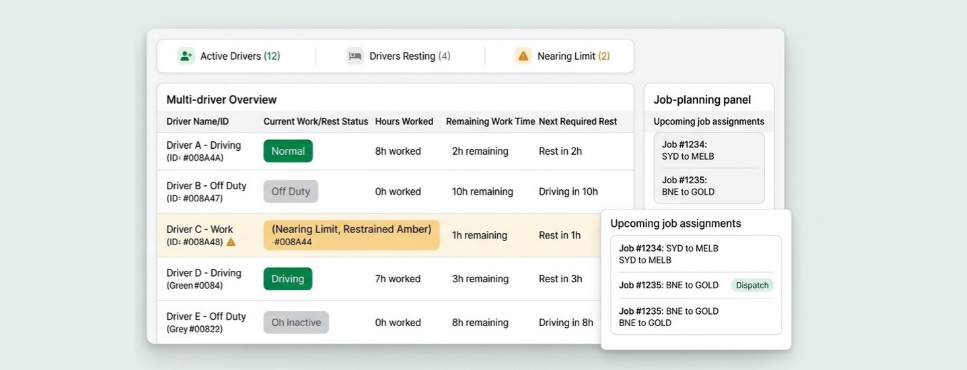
See every driver’s hours from the office
Plan work around real hours.
Record keepers and schedulers see work and rest records for all drivers in ManageVehicle. Spot drivers close to their limits before you hand out the next job.
What your team can do- Work and rest by driver
- Drivers near their limits
- Plan jobs around hours left
Audit-ready records without the filing cabinet
Records kept for you, ready when needed.
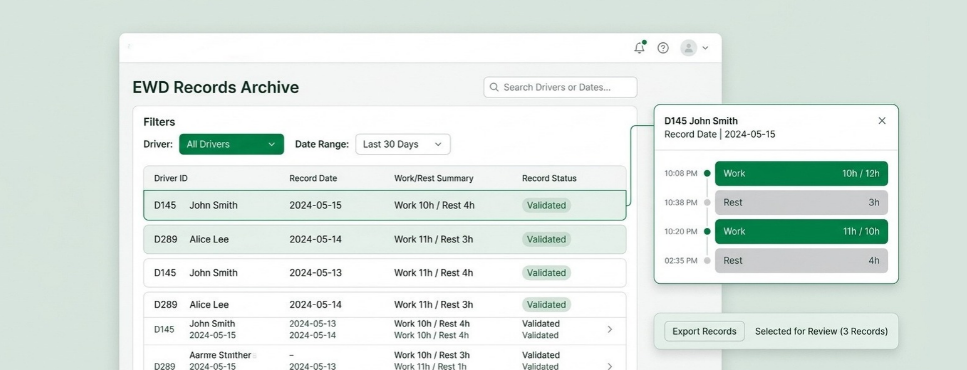
Every entry is stored and searchable by driver and date. When an auditor or the NHVR asks, you can pull up the records in minutes.
What your team can do- Search by driver and date
- Breach history
- Export for audits
What a shift looks like with MV Driver
Here’s how a typical day runs when a driver uses MV Driver instead of a paper diary.
-
01
Before the shift
The driver opens MV Driver and checks their hours. The app shows how much work time is left before the next required rest, so they know straight away whether today’s run fits.
-
02
Starting work
One tap starts the work period. Every entry in MV Driver is time-stamped and location-stamped, so there’s no writing up a start time later or guessing where the shift began.
-
03
On the road
The app keeps counting as the driver works. If the phone loses reception, entries are stored on the phone and sync to ManageVehicle when it’s back online. As a limit gets close, MV Driver warns the driver so they can plan a rest stop rather than run out of hours mid-trip.
-
04
Rest breaks
The driver records each break in the app. MV Driver applies the counting rules for the hours they work under, whether that’s Standard hours, BFM, AFM, Alternative Compliance Hours or WA rules. Under the amended regulation, EWD time is counted in one-minute periods, and a rest of less than 15 minutes doesn’t count towards a minimum rest time.
-
05
At a roadside check
If an officer asks for the work diary, the driver hands over the phone showing the Compliance View. The app is password-locked, so the officer sees the work and rest record and nothing else.
-
06
End of the shift
The driver ends work in the app. Totals are worked out automatically, and the record goes to the office, where the record keeper can see it next to every other driver’s hours.
Stop asking “How many hours has he got left?”
The fatigue questions your schedulers and drivers ask every shift, answered on screen.
-
How long can Sam drive before a break?
Check hours left in MV Driver.
-
Who’s close to their limit today?
View drivers near their limits.
-
Did anyone breach last week?
Open the breach history.
-
Where’s Raj’s diary from Tuesday?
Search records by driver and date.
-
Can we take this extra job?
Check driver hours before assigning.
Get your drivers on MV Driver in 4 steps
-
01
Book a demo
We’ll set up your ManageVehicle account around your fleet.
-
02
Invite your drivers
Add your drivers so they can start using MV Driver.
-
03
Drivers download MV Driver
From the App Store or Google Play, onto the phone they already carry.
-
04
Start recording
Drivers start and end work in the app, and records go to the office automatically.


How much does an electronic work diary cost?
MV Driver is included free in every ManageVehicle plan. There’s no separate EWD fee and no charge per driver: you pay for the fleet, and every driver can use the app.
- No separate EWD fee
- No charge per driver
- Included in every plan
Connected EWD and fleet operations
Work diary records do more when they sit next to tracking, jobs and fatigue management.
-
EWD + GPS
Back up hours with movement data
Includes
- Work and rest times
- Trip start and end
- Rest stop locations
- Distance travelled
-
EWD + dispatch
Plan jobs around hours left
Includes
- Hours available per driver
- Jobs assigned
- Planned vs actual times
- Drivers near limits
-
EWD + fatigue management
Manage fatigue beyond the diary
Includes
- Fit-to-drive checks
- Fatigue alerts
- Breach follow-up
- Driver notes
-
EWD + dashcams
Add context to fatigue events
Includes
- Fatigue or distraction alerts
- Dashcam footage
- Hours worked
- Location
-
Reports and insights
Turn diary data into compliance reports
Includes
- Hours by driver
- Breaches
- Rest patterns
- Audit exports
-
Australian fleet operations
Built for Australian heavy vehicle rules
Includes
- NHVR-approved EWD
- Driver app on iOS and Android
- Australian customer support
- Office and driver views
Electronic work diary vs paper logbook
Both meet the requirement. Only one does the maths, warns before a breach and sends records to the office.
Paper written work diary
The traditional way to record work and rest.
- Handwritten entries
- Manual time counting
- Breaches found after the fact
- Pages collected by hand
MV Driver EWD
The NHVR-approved digital alternative.
- Work and rest in a few taps
- Automatic totals
- Warnings before a breach
- Records in the office straight away
- Searchable history for audits
What drivers and record keepers must do when using an EWD
An electronic work diary doesn’t change who is responsible for the record. It changes how the record is kept. These are the main obligations under the HVNL.
Drivers must
- Carry the work diary while driving, including the previous 28 days of records. If a driver used both a written diary and an EWD in that time, they carry both.
- Show it to an authorised officer when asked. Officers can view the EWD and take an extract, including by downloading information from the device.
- Use the EWD the way it was approved, following its conditions of approval and the manufacturer’s instructions.
- Tell their record keeper about problems. If the EWD is lost, stolen or stops working, the driver tells their record keeper within 2 business days. A driver who is their own record keeper notifies the NHVR within 2 business days.
- Keep supplementary records if the EWD can’t be used, until a working EWD or a written work diary is in use, for up to 7 business days.
Record keepers must
- Keep work and rest records for 3 years, including the information from the electronic work diary, at the driver’s record location and readily available to an authorised officer.
- Act on a malfunction. Direct the driver to use a supplementary record, give them the last 28 days of records the EWD can’t show, notify the NHVR within 2 business days, and get the EWD working again within the time the NHVR requires.
- Replace a lost or stolen EWD with a working one and any recoverable records from the last 28 days, and notify the NHVR within 2 business days.
- Hand over records when a driver stops using the EWD, giving them the information recorded in the work diary straight away.
With MV Driver, records are stored in ManageVehicle automatically and kept for 3 to 7 years depending on the type of record, so the record keeper already holds what the law asks for and can find it by driver and date.
What the 2026 HVNL changes mean for electronic work diaries
The amended Heavy Vehicle National Law commenced on 1 August 2026. For electronic work diaries, the main points are:
- EWDs are still voluntary. The NHVR has confirmed the amended HVNL doesn’t change the status of electronic work diaries. They remain a voluntary alternative to the written work diary and aren’t compulsory under Alternative Compliance Hours.
- Some written diary fields became optional. Marking the day of the week, marking the standard hours checkbox and recording daily work and rest totals in the written work diary are now optional. An EWD works out totals automatically, so this mostly affects drivers on paper.
- Time is counted in one-minute periods. The regulation now states that EWD work and rest time is counted in one-minute periods.
- Higher penalties for false records. Penalties for false or misleading work diary entries went up, so accurate, time-stamped entries matter more than ever. See the NHVR’s penalties and infringements for current figures.
- A new EWD framework is coming. The NHVR is developing a Generation 2.0 EWD framework. It’s separate from the HVNL changes, and the NHVR says there are no immediate changes for drivers, operators or record keepers using an approved EWD.
What to look for in an electronic work diary provider
Choosing an EWD? These are the checks that matter, and how MV Driver meets each one.
| What to check | How MV Driver meets it |
|---|---|
| It’s on the NHVR approved register | MV Driver is on the NHVR approved EWD register (certificate MANV-2026-001). |
| It works offline and syncs later | Drivers keep recording with no reception, and the app syncs when the phone is back online. |
| It supports the rules you work under | All NHVR rulesets (Standard hours, BFM, AFM and Alternative Compliance Hours) and WA rules, plus custom company-specific rulesets. |
| It warns before a breach | Drivers see the time remaining before rest and get a warning before a breach. |
| Officers get secure access | At a roadside check an officer sees only the Compliance View, and the app is password-locked when handed over. |
| The office gets an audit-ready view, with no per-driver fees | Office view with audit export, and no per-driver fees: EWD is included in every plan. |
Electronic work diary FAQs
Quick answers about MV Driver, approvals, rules and cost.
What is an electronic work diary?
An electronic work diary is an NHVR-approved app that records a driver’s work and rest times digitally, instead of a paper written work diary.
Is MV Driver approved by the NHVR?
Yes. MV Driver has been on the NHVR’s approved EWD register since 22 September 2026, under certificate MANV-2026-001.
Is an EWD compulsory?
No. Drivers who need a work diary can use either the paper written work diary or an approved EWD. Many operators switch to an EWD for accuracy and easier record keeping.
Who needs to carry a work diary?
Generally, drivers of fatigue-regulated heavy vehicles who work more than 100 km from their base, measured as a straight line from the base. Check the NHVR’s current guidance for your situation. Our fatigue management guide explains work and rest hours, work diaries and breaches in full, and our work diary guide covers the daily sheet.
Where does the HVNL apply?
The Heavy Vehicle National Law (HVNL) applies in the ACT, New South Wales, Queensland, South Australia, Tasmania and Victoria. Western Australia and the Northern Territory haven’t adopted it. MV Driver also supports WA fatigue rules.
Does MV Driver warn drivers before a breach?
Yes. It shows how much work time is left and warns drivers before they hit their limit.
Can the office see drivers’ hours?
Yes. Record keepers and schedulers see work and rest records for every driver in ManageVehicle.
What devices does MV Driver run on?
MV Driver runs on iOS and Android phones. We’ll walk you through setup and driver onboarding during the demo.
How much does an EWD cost?
MV Driver is included free in every ManageVehicle plan, with no extra fee per driver. See pricing for the plan details.
Does MV Driver work without phone reception?
Yes. Drivers keep recording offline, and the app syncs when the phone is back online.
Does MV Driver support BFM, AFM, ACH and WA rules?
Yes. It supports all NHVR rulesets, including Standard hours, BFM, AFM and the new Alternative Compliance Hours (ACH), as well as WA rules. Custom company-specific rulesets can also be configured. See our work and rest hours guide.
What does a police or NHVR officer see at a roadside check?
Only the Compliance View, which shows the driver’s work and rest history as required for fatigue obligations. The app is password-locked when handed to an officer, so nothing else can be accessed.
How long are MV Driver records kept?
Record keepers must keep work and rest records, including the information from an electronic work diary, for 3 years. ManageVehicle keeps records for 3 to 7 years depending on the type of record and the regulatory requirement, and retention can be adjusted to suit your company. Records can be searched by driver and date.
Can drivers switch between a paper work diary and MV Driver?
Yes. Drivers can change between a written work diary and an EWD, but they must not record the same period in both. When they switch, they record the time and location of the change in both diaries and the written diary’s security number in the EWD, and they carry the last 28 days of records from both.
What if the phone’s battery goes flat or the phone stops working?
Entries already recorded are stored on the phone and sync to ManageVehicle once it’s working and online again. For any time the EWD can’t be used, the driver tells their record keeper within 2 business days and keeps a supplementary record, for up to 7 business days or until they’re using a working EWD or a written work diary again.
Does MV Driver work for two-up drivers?
Yes. MV Driver supports two-up driving. Each driver uses MV Driver on their own phone and records their own work and rest.
What if a driver works for more than one operator?
A driver can be linked to more than one operator in MV Driver. When they log in, they choose which operator they’re working for that day. Under the HVNL, each record keeper is responsible only for the work the driver does for them, and the same period can’t be recorded in two work diaries.
Does the NHVR see my drivers’ work and rest data automatically?
No. Work and rest records in ManageVehicle are available to your own team members who have access to the platform, and the NHVR and other external parties can’t access the system without your authority. At a roadside check, an officer sees the Compliance View on the driver’s phone and can take an extract, and the NHVR can require records from the record keeper under the HVNL.
Where do drivers download MV Driver?
From the App Store or Google Play.
Sources: Heavy Vehicle National Law and the Heavy Vehicle (Fatigue Management) National Regulation, as in force from 1 August 2026; NHVR electronic work diary pages and guides; NHVR HVNL amendments FAQ (21 October 2026); NHVR schedule of penalties, 1 August 2026 to 30 June 2027. This is general information, not legal advice.
Explore more ways to connect
-
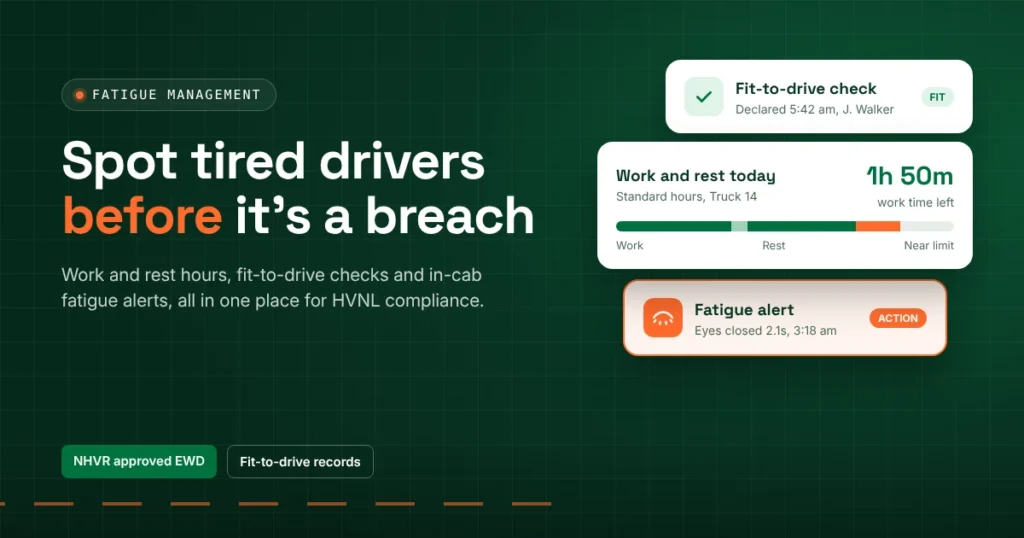 Fatigue Management
Fatigue management software for HVNL. Fit-to-drive checks, fatigue alerts and breach follow-up, alongside your EWD records.
Explore Fatigue Management

-
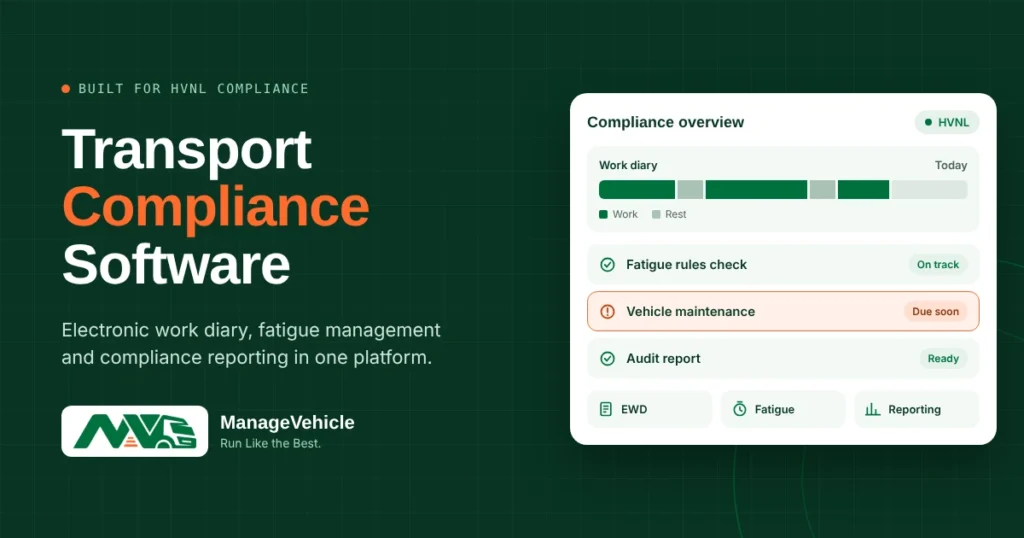 Transport Compliance
Fleet compliance software for HVNL. Keep EWD records, fatigue alerts, maintenance and audit reports in one place, ready for audits.
Explore Transport Compliance
-
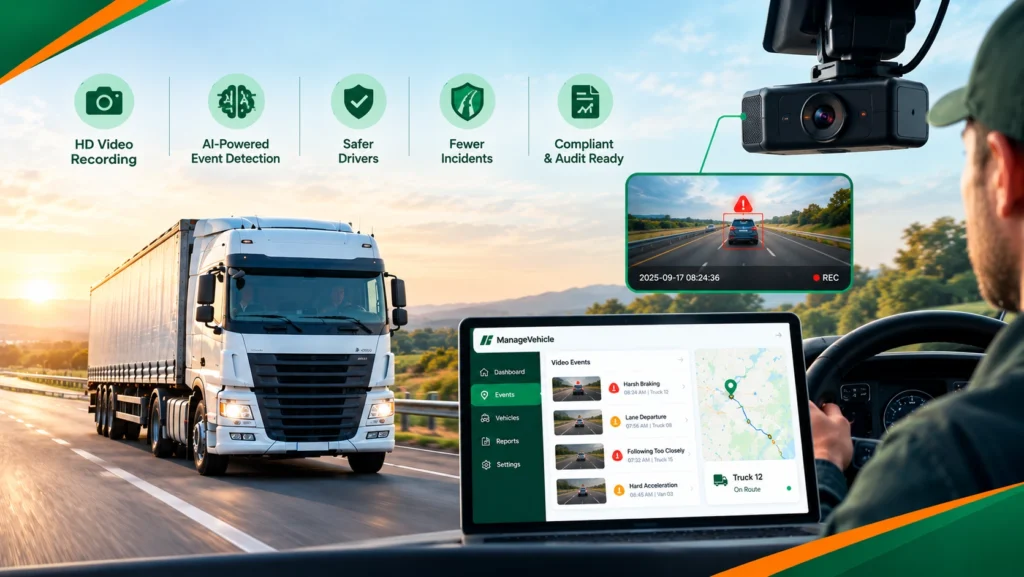 Smart Dashcams
Smart dashcams that record road and cab footage with the location, speed and driver for every event.
Explore Smart Dashcams
Ready to run like the best?
Get a 30-minute walkthrough of ManageVehicle set up around your fleet. We’ll show you how tracking, EWD, maintenance and risk management work together, and answer your HVNL questions on the spot.
- Walkthrough based on your fleet size and setup
- Your HVNL and EWD questions answered live
- Local Australian support team
See ManageVehicle in action
Tell us a bit about your fleet and we’ll be in touch within one business day.